MFA for Cloud Accounts: 8 Practices to Prevent Credential Theft
Multi-factor authentication fails when you rely on convenience features like push notifications, which attackers exploit through fatigue attacks and sophisticated phishing proxies.
Secure cloud accounts by replacing push notifications with hardware security keys or offline scratch codes. Enforce MFA for all roles, including service accounts, and monitor for authentication anomalies. Disable legacy protocols and use conditional access to balance security with user productivity.
The Illusion of Push Notification Safety
You likely trust the simple approve/deny button on your smartphone. This convenience creates a dangerous blind spot. Attackers exploit this trust through multi-factor authentication fatigue attacks, where they spam your device with requests until you accidentally approve one. They also use man-in-the-middle proxies that intercept the session token after you approve a legitimate login, then inject that token into a fraudulent session.
Push notifications verify that you hold the device, not that you intend to log in from a specific location or browser. This distinction matters because a stolen session token is as valuable to an attacker as a password. You must treat push approvals as weak signals compared to cryptographic proof.
Hardware Keys and FIDO2 Standards
The most reliable method for verifying identity is a physical security key. These devices use the FIDO2 standard, which binds the authentication to the specific website or service you are visiting. This binding prevents phishing because the key will not sign a request for a fake domain that mimics your cloud provider.
Hardware keys are resistant to malware, keyloggers, and phishing attempts. They provide cryptographic proof of possession. While they require a physical action, this friction is the price of true security. You should issue these keys to all administrative and sensitive accounts immediately.
Eliminating SMS as a Second Factor
Short message service relies on the cellular network, which is neither secure nor private. Attackers can hijack your phone number through social engineering at your mobile carrier, a technique known as SIM swapping. Once they control your number, they intercept the verification codes.
SMS messages are also subject to interception via over-the-air sniffing in certain networks. They provide no binding to the application requesting the code. You should disable SMS-based multi-factor authentication for all cloud accounts. Replace it with an authenticator app that generates time-based one-time passwords or, better yet, a hardware key.
Securing Service Accounts and Workloads
Most organizations focus MFA efforts on human users, leaving service accounts exposed. Service accounts are automated identities that applications use to access cloud resources. Attackers target these accounts because they often have persistent access and lack interactive login protections.
You cannot enforce traditional MFA on a script or a server. Instead, you must use machine identity management techniques. This involves short-lived tokens, certificates, or workload identity federation. These methods ensure that the identity exists only for the duration of the task and cannot be reused if stolen. Refer to our guide on cloud privilege escalation to understand how compromised service accounts expand attacker access.
Conditional Access and Risk-Based Policies
Static rules are brittle. A policy that blocks all logins from outside the office breaks when you travel or work from a coffee shop. Conditional access evaluates the context of each login attempt. It considers the user’s location, the device health, and the sensitivity of the data being accessed.
If a login occurs from a new country on an unmanaged device, the system can require an additional step. If the login is from a trusted device on your home Wi-Fi, it can allow seamless access. This approach balances security with productivity. You must define what constitutes a "trusted" device and enforce device compliance before granting access. See our article on cloud landing zones for how to structure these environments securely from the start.
See also: Bot Management Misconceptions: What Cloud Security Teams Get Wrong · Cloud Detection and Response: 6 Misunderstandings That Leave You Exposed
Monitoring for Authentication Anomalies
Even with strong controls, attacks will occur. You need visibility into authentication events. Most cloud providers generate detailed logs for every login attempt, success or failure. You must ingest these logs into a central security information and event management system.
Look for patterns that indicate compromise. Multiple failed attempts followed by a success is a red flag. Logins from geographically impossible locations within minutes are another. Set up alerts for these anomalies. Regular review of cloud audit logs helps you spot these subtle deviations before they lead to data exfiltration.
Rotating and Revoking Access Tokens
Many cloud services use long-lived access keys or tokens for API access. If an attacker steals one of these keys, they can access your resources indefinitely, bypassing interactive MFA entirely. You must treat these keys as high-value secrets.
Implement automated rotation of these keys. This reduces the window of opportunity for an attacker who has stolen a key. Monitor for unused keys and revoke them immediately. This practice helps prevent the accumulation of orphaned cloud resources that carry hidden security risks. Use bring your own key encryption to ensure that even if metadata is compromised, the underlying data remains protected by keys you control.
Enforcing MFA for All Privileged Roles
Administrative accounts are the crown jewels of your infrastructure. Attackers prioritize these accounts because they grant broad control. You must enforce the strongest form of multi-factor authentication for any account with administrative privileges.
This means hardware keys or certified phishing-resistant methods. Password-only or SMS-based MFA is insufficient for these roles. You should also implement just-in-time access, where administrators receive elevated privileges only when needed and for a limited time. This reduces the attack surface. Regular cloud security assessments can help you identify privileged accounts that have been neglected.
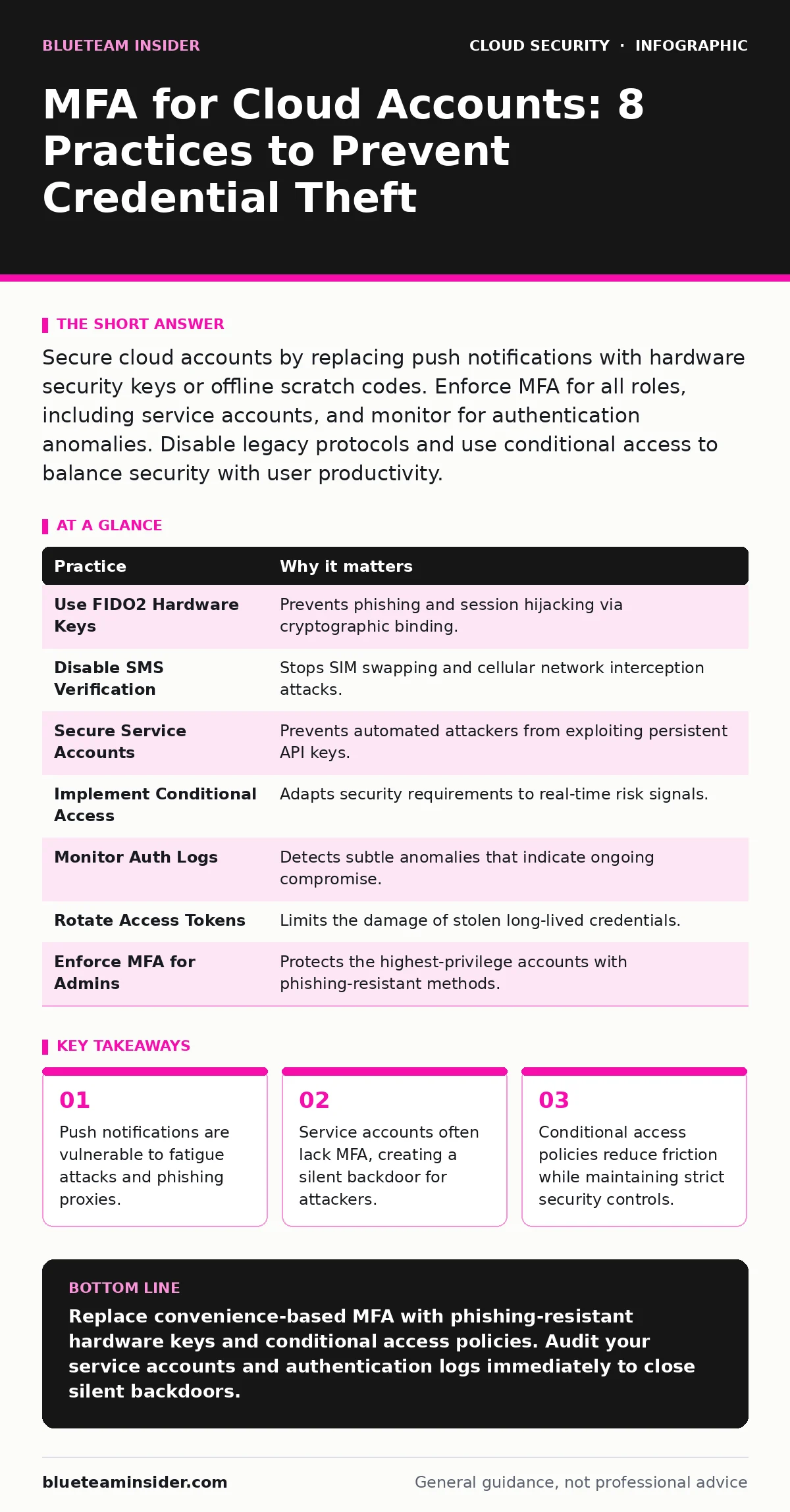
| Practice | Why it matters |
|---|---|
| Use FIDO2 Hardware Keys | Prevents phishing and session hijacking via cryptographic binding. |
| Disable SMS Verification | Stops SIM swapping and cellular network interception attacks. |
| Secure Service Accounts | Prevents automated attackers from exploiting persistent API keys. |
| Implement Conditional Access | Adapts security requirements to real-time risk signals. |
| Monitor Auth Logs | Detects subtle anomalies that indicate ongoing compromise. |
| Rotate Access Tokens | Limits the damage of stolen long-lived credentials. |
| Enforce MFA for Admins | Protects the highest-privilege accounts with phishing-resistant methods. |
| Use Short-Lived Certificates | Reduces the value of stolen machine identities. |
Integrating with Incident Response Plans
Multi-factor authentication is not a silver bullet. When a breach occurs, you need to know how to disable compromised accounts quickly. Your incident response plan must include steps for revoking MFA registrations and resetting credentials.
Practice this process regularly. Ensure that break-glass accounts, which are used for emergency access, are isolated and protected by hardware keys. Refer to our guide on cloud incident response for detailed procedures on containing breaches that bypass authentication controls. Finally, ensure your security posture meets regulatory requirements by reviewing cloud compliance standards regularly.
Key takeaways
- Push notifications are vulnerable to fatigue attacks and phishing proxies.
- Service accounts often lack MFA, creating a silent backdoor for attackers.
- Conditional access policies reduce friction while maintaining strict security controls.
Replace convenience-based MFA with phishing-resistant hardware keys and conditional access policies. Audit your service accounts and authentication logs immediately to close silent backdoors.
Frequently asked questions
Is an authenticator app better than SMS for MFA?
Yes, because it does not rely on the cellular network, which is vulnerable to SIM swapping and interception. Authenticator apps generate codes locally on your device.
Can I use MFA for server-to-server communication?
Traditional MFA is for interactive logins. For server-to-server, use mutual TLS certificates or workload identity federation to verify machine identities cryptographically.
What happens if I lose my hardware security key?
You must have a backup key or offline scratch codes stored securely. Without these, you may be permanently locked out of your account.
Does conditional access slow down users?
It can, if configured poorly. Properly tuned, it allows seamless access for trusted devices and locations while challenging only suspicious or high-risk login attempts.
How this guide was produced: written by the BlueTeam Insider editorial team with AI assistance, checked against the public references listed below, and reviewed when the facts change. See our editorial policy or report an error.