Login Alerts for Small Teams: Stop Account Takeovers Fast
Most small business breaches begin with a silent login from an unfamiliar location that standard password checks never catch.

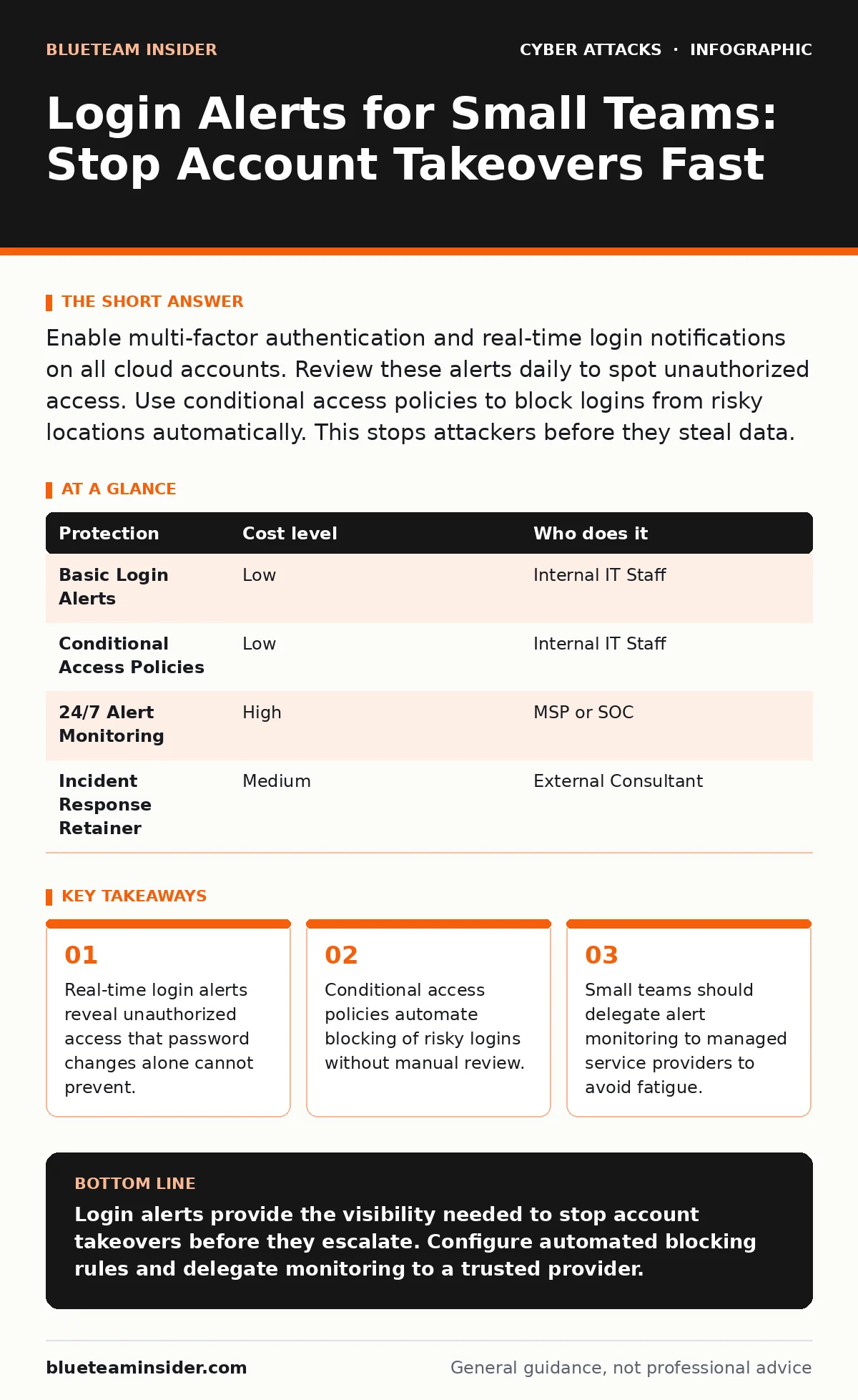
Enable multi-factor authentication and real-time login notifications on all cloud accounts. Review these alerts daily to spot unauthorized access. Use conditional access policies to block logins from risky locations automatically. This stops attackers before they steal data.
The Silent Entry Point
Most organizations focus on preventing the initial break-in. They spend hours configuring firewalls and training staff to recognize phishing attempts. This is necessary, but it is not enough. The real danger often lies in what happens after the credentials are compromised. Attackers do not always need to trick you again. They simply use the stolen keys to enter the building.
When an attacker gains valid credentials, they look like a legitimate user to most systems. Traditional security tools that only check the password often miss this. The system sees a correct username and password and grants access. It does not ask where the user is or what device they are using. This gap allows attackers to operate in plain sight for days or weeks.
Login alerts change this dynamic. They provide a second layer of verification based on context rather than just secrets. If a login occurs from an unusual location or device, the system flags it. This gives you a chance to intervene before the attacker moves deeper into your network. For small teams, this visibility is the difference between a contained incident and a total compromise.
Why Small Teams Are Vulnerable
Small businesses often believe their size protects them. They assume hackers only target large corporations with valuable data. This assumption is dangerous. Attackers use automated tools to scan for weak accounts across the internet. They do not care about company size; they care about easy access. A small business with fewer security controls is an easier target than a hardened enterprise.
The problem is amplified by shared accounts. Many small teams use a single login for email or cloud storage. When multiple people use the same credentials, it becomes impossible to track who did what. If an alert fires, you do not know which employee’s device was compromised. This lack of accountability delays response times. It also makes it harder to revoke access for a specific individual without disrupting the whole team.
Furthermore, small teams often lack dedicated security staff. The person managing IT is usually handling everything from printer repairs to software updates. They do not have the bandwidth to monitor logs continuously. This creates a blind spot. Alerts pile up in an inbox that is rarely checked. By the time someone notices the anomaly, the damage is already done.
Affordable Detection Mechanisms
You do need expensive security operations centers to detect bad logins. Most modern cloud platforms include basic alerting features at no extra cost. These features can notify you via email or mobile push notification when a login occurs. The key is to configure them correctly. You must define what constitutes an unusual login.
Start by enabling alerts for logins from new devices. Every computer or phone is unique. The system assigns a hardware identifier to each. If a login comes from an identifier it has never seen, it triggers a warning. This catches attackers who have stolen credentials but are using their own machines. It also helps identify when an employee loses a laptop.
Next, enable alerts for logins from new geographic locations. If your team works only in one city, a login from a different country is highly suspicious. This is not foolproof, as employees may travel. However, it provides a strong signal for investigation. Combine this with email authentication protocols to ensure the alert itself has not been forged. This prevents attackers from sending fake alerts to distract you.
Automating the Response
Receiving an alert is only half the battle. You must act on it. Manual review is slow and prone to error. Humans get tired. They miss details. They delay responses due to uncertainty. Automation removes the human element from the initial triage. It ensures that every suspicious event gets immediate attention.
Use conditional access policies to automate blocking. These are rules that tell your system how to handle logins based on context. For example, you can set a rule to block all logins from countries where you do not do business. If an attempt is made from a blocked region, the system denies access immediately. No human needs to review it. This stops automated attacks in their tracks.
You can also automate password resets. If a login fails multiple times from a new location, the system can force a password change. This disrupts password spraying attacks, where hackers try one common password against many accounts. By forcing a reset, you invalidate the stolen credential before the attacker can use it. This adds friction to the attack process, often causing automated bots to give up.
What to Delegate
Small teams cannot monitor alerts twenty-four hours a day, seven days a week. Attackers operate on global time zones. They strike when your team is asleep. Trying to monitor alerts yourself leads to burnout and missed detections. You need a partner who can watch the screens for you.
Managed Service Providers (MSPs) offer Security Information and Event Management (SIEM) services. They aggregate logs from your various systems and analyze them for threats. They have the tools and staff to review alerts continuously. When they see a suspicious login, they investigate it immediately. This provides you with round-the-clock protection without hiring a full security team.
When choosing a provider, ask specific questions about their alert handling process. Do not accept vague promises. You need to know exactly how they detect and respond to login anomalies. This ensures they are actually doing the work you are paying for.
| Protection | Cost level | Who does it |
|---|---|---|
| Basic Login Alerts | Low | Internal IT Staff |
| Conditional Access Policies | Low | Internal IT Staff |
| 24/7 Alert Monitoring | High | MSP or SOC |
| Incident Response Retainer | Medium | External Consultant |
See also: Email Spoofing Risks and Protection for Small Businesses · Port Scanning Risks and Protection for Small Business Networks
Questions for Your IT Provider
Before hiring an MSP or consultant, verify their capabilities. Many providers offer generic IT support but lack deep security expertise. You need to know how they handle identity-related threats. Ask them about their specific procedures for login alerts.
- How do you distinguish between a legitimate travel-related login and a compromise?
- What is your average response time for a high-priority login alert?
- Do you use automated blocking for known malicious IP addresses?
- How do you handle alerts for shared service accounts?
- Can you provide a sample report of login anomalies detected last month?
These questions reveal whether the provider has a structured approach to identity security. If they struggle to answer, look elsewhere. Identity is the new perimeter. Your provider must treat login alerts with the same seriousness as network intrusions.
Human Oversight Remains
Automation is powerful, but it is not perfect. False positives occur. An employee might log in from a hotel Wi-Fi that looks suspicious. An automated block could lock them out when they are working. You need a human to review these edge cases. This is where the human factor in security comes into play.
Train your team to recognize and report suspicious login alerts. They should know what a normal alert looks like and what an abnormal one looks like. If they receive an alert they did not trigger, they should report it immediately. This creates a culture of shared responsibility. It ensures that alerts are not ignored.
Regularly review your alert settings. As your business grows, your travel patterns may change. You may open a new office in a different region. Your alert rules must evolve with your business. Static rules become obsolete quickly. They either block legitimate users or miss new types of attacks. Periodic reviews keep your defenses aligned with your reality.
Integrating with Broader Defense
Login alerts do not work in isolation. They are part of a larger security strategy. If an attacker bypasses your login alerts, they may still be stopped by other controls. For example, network segmentation limits how far an attacker can move once inside. Even if they gain access to one account, they cannot reach the entire network.
Combine login monitoring with regular phishing simulations. If your team clicks on phishing links, they may hand over credentials. Simulations help identify which employees are vulnerable. You can then provide targeted training to reduce the risk of credential theft. This reduces the number of successful login attempts by attackers.
Finally, consider the physical security of your devices. Shoulder surfing can reveal passwords or PINs. If an attacker watches you enter your credentials, your login alerts may never fire because the login appears legitimate. Ensure your devices are locked when unattended. Use screen privacy filters if you work in public spaces. This closes the physical gap that digital tools cannot address.
Key takeaways
- Real-time login alerts reveal unauthorized access that password changes alone cannot prevent.
- Conditional access policies automate blocking of risky logins without manual review.
- Small teams should delegate alert monitoring to managed service providers to avoid fatigue.
Login alerts provide the visibility needed to stop account takeovers before they escalate. Configure automated blocking rules and delegate monitoring to a trusted provider.
Frequently asked questions
How long should I keep login alert logs?
Keep logs for at least one year to support forensic investigations and compliance audits. Longer retention helps identify long-term patterns of suspicious activity.
Can attackers disable login alerts?
Yes, if they gain admin access. Use role-based access control to limit who can change security settings. Monitor admin account activity closely.
Do free accounts include login alerts?
Many free cloud accounts include basic alerts. Check your specific platform settings. Paid tiers often offer more detailed logs and faster notifications.
What if I travel frequently?
Pre-register your travel locations in your security settings. This prevents false alerts when you log in from new countries or cities.
How this guide was produced: written by the BlueTeam Insider editorial team with AI assistance, checked against the public references listed below, and reviewed when the facts change. See our editorial policy or report an error.