Email Spoofing Risks and Protection for Small Businesses
Spoofing exploits open email standards, meaning your domain reputation alone cannot stop an attacker from impersonating your brand to external partners.
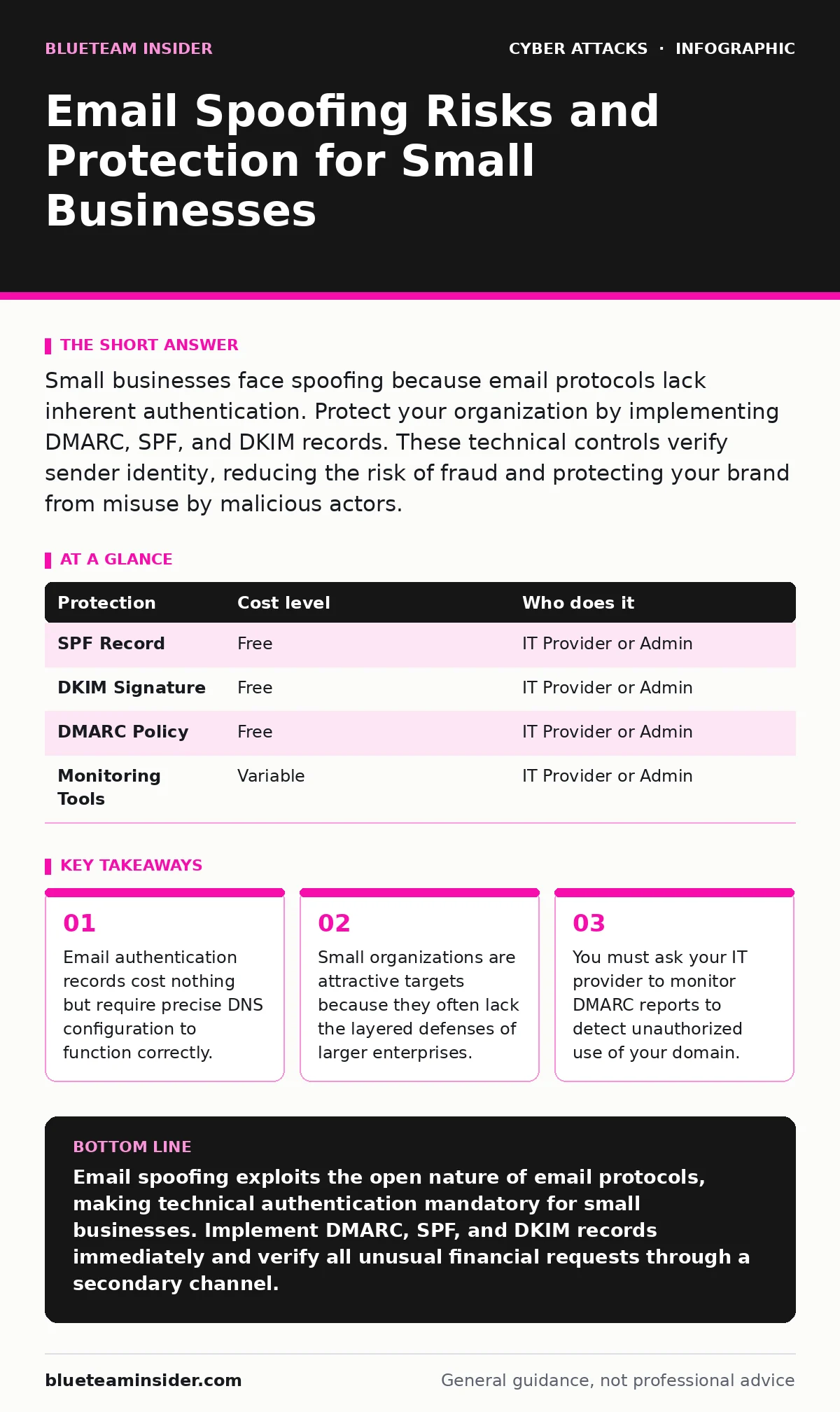
Small businesses face spoofing because email protocols lack inherent authentication. Protect your organization by implementing DMARC, SPF, and DKIM records. These technical controls verify sender identity, reducing the risk of fraud and protecting your brand from misuse by malicious actors.
Why Small Organizations Are Exposed
Small businesses often believe their size protects them from sophisticated cyber attacks. This assumption is dangerous. Attackers target small organizations precisely because they lack dedicated security teams. The financial loss from a single successful spoofing attempt can cripple a small company.
Email was designed for openness, not security. The Simple Mail Transfer Protocol (SMTP) allows any server to send mail to any other server. It does not verify the sender’s identity by default. This design flaw enables spoofing. An attacker can craft an email that appears to originate from your domain without ever touching your servers.
This vulnerability is distinct from phishing, which relies on social engineering to trick users into clicking malicious links. Spoofing is a technical manipulation of the email header. It makes the fake message look like it came from a trusted source. You cannot fix this by training staff to be more careful. You must fix the underlying protocol weakness.
The Mechanics of Domain Spoofing
To understand the risk, you must understand how email routing works. When you send an email, your server tells the recipient’s server where the message came from. This information is stored in the email header. Spoofing involves altering this header to display a different sender address.
The attacker does not need to hack your email account. They only need to know your domain name. Using free tools, they can create an email that displays your company’s address. The recipient sees your logo and your name. The content appears trustworthy.
This technique exploits the gap between visual trust and technical verification. Humans trust what they see. Computers can verify what is true. Without technical controls, the visual lie succeeds. The recipient’s email client displays the spoofed address because the sending server claimed it was valid.
Low-Cost Technical Protections
You can block most spoofing attempts with three open standards. These are free to implement but require correct configuration. They add verification layers to your email infrastructure.
SPF (Sender Policy Framework) publishes a list of IP addresses authorized to send email for your domain. If an email arrives from an unauthorized IP, the recipient’s server can reject it. This stops basic spoofing.
DKIM (DomainKeys Identified Mail) adds a cryptographic signature to your emails. This signature proves the message was not altered in transit. It links the email to your domain.
DMARC (Domain-based Message Authentication, Reporting, and Conformance) ties SPF and DKIM together. It tells recipient servers what to do if an email fails verification. You can set it to reject the message outright. This is the strongest protection.
| Protection | Cost level | Who does it |
|---|---|---|
| SPF Record | Free | IT Provider or Admin |
| DKIM Signature | Free | IT Provider or Admin |
| DMARC Policy | Free | IT Provider or Admin |
| Monitoring Tools | Variable | IT Provider or Admin |
The Hidden Cost of Misconfiguration
Implementing these protections is not a one-time task. It requires ongoing maintenance. A common mistake is setting DMARC to "reject" too quickly. If your marketing software or CRM system sends email from your domain, you must include their servers in your SPF record. If you miss one, legitimate emails will bounce.
This creates a hidden operational cost. You must audit every service that sends email on your behalf. This includes newsletters, password reset emails, and automated alerts. If a service changes its IP addresses, your SPF record may break. You must update it.
The Human Factor and Social Engineering
Technical controls stop fake emails from entering the inbox. They do not stop attackers from using your real email account. If an attacker compromises your actual account, the email will pass all authentication checks. This is why human factor in security remains a critical component of your defense.
Staff must verify unusual requests through a second channel. If a CEO requests an urgent wire transfer via email, call them on a known number. Do not use the phone number in the email. Attackers often spoof the CEO’s email and include a new phone number in the signature.
This verification step adds friction. It slows down workflows. However, it prevents catastrophic financial loss. The cost of a two-minute phone call is far lower than the cost of fraud. Train staff to expect this friction. Make it a standard operating procedure.
See also: Email Authentication Best Practices to Stop Spoofing · Server-Side Request Forgery: Risks and Protection for Small Businesses
What to Ask Your IT Provider
Your IT provider manages your email infrastructure. They must understand these protocols. Do not accept vague promises. Ask specific questions to ensure your protections are active and effective.
- Does our domain have a published SPF record that includes all authorized sending services?
- Is DKIM enabled for all outbound email traffic?
- What is our current DMARC policy, and do we review the aggregate reports?
- How do we handle email from third-party vendors that fail authentication?
- Do we have a process for updating DNS records when we add new email services?
Monitoring and Continuous Improvement
Protection is not static. Attackers adapt. New services are added. IP addresses change. You must monitor your DMARC reports. They reveal unauthorized use.
Review these reports regularly. Look for failures. Investigate unknown sources. If you see traffic from a server you do not recognize, block it. This proactive approach reduces your attack surface. It also helps maintain your domain reputation.
Key takeaways
- Email authentication records cost nothing but require precise DNS configuration to function correctly.
- Small organizations are attractive targets because they often lack the layered defenses of larger enterprises.
- You must ask your IT provider to monitor DMARC reports to detect unauthorized use of your domain.
Email spoofing exploits the open nature of email protocols, making technical authentication mandatory for small businesses. Implement DMARC, SPF, and DKIM records immediately and verify all unusual financial requests through a secondary channel.
Frequently asked questions
Can I stop spoofing with just a spam filter?
No. Spam filters analyze content and sender reputation. They cannot verify the technical identity of the sender. Authentication records are required to prove the email originated from your domain.
Do I need DMARC if I already have SPF and DKIM?
Yes. SPF and DKIM provide the data, but DMARC provides the policy. Without DMARC, recipient servers do not know how to handle emails that fail verification. DMARC ensures failed emails are rejected or quarantined.
How long does it take to set up these protections?
Basic setup can take a few hours. However, auditing all sending services and monitoring reports for errors may take weeks. Rushing the process can cause legitimate emails to be blocked.
What if I use a cloud email provider?
Cloud providers often simplify setup. However, you must still ensure their servers are listed in your SPF record and that DKIM is enabled. You remain responsible for the domain configuration.
How this guide was produced: written by the BlueTeam Insider editorial team with AI assistance, checked against the public references listed below, and reviewed when the facts change. See our editorial policy or report an error.