7 Mistakes That Allow Domain Spoofing and How to Fix Them
Most domain spoofing succeeds not because attackers break encryption, but because organizations fail to verify the true origin of incoming digital messages.
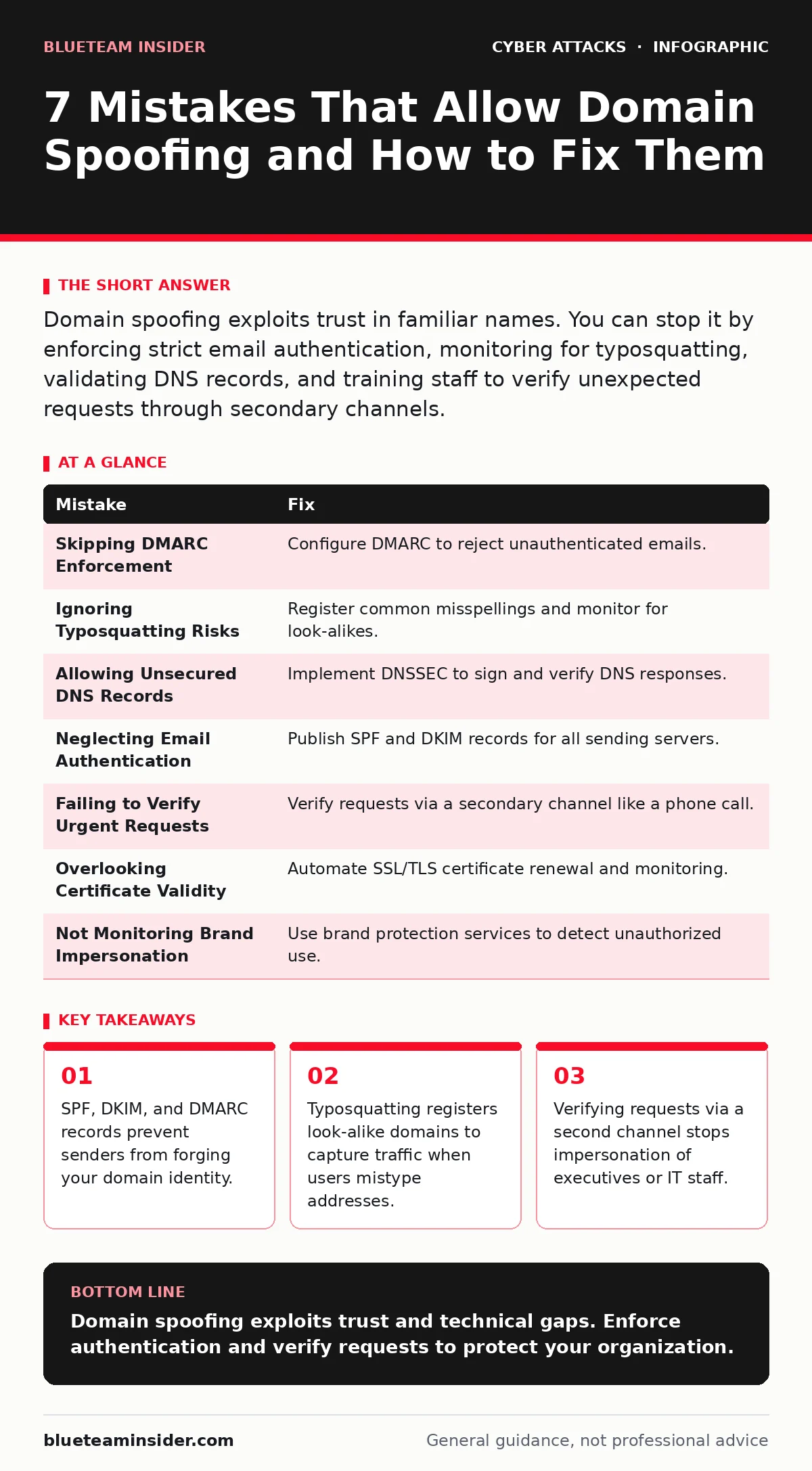
Domain spoofing exploits trust in familiar names. You can stop it by enforcing strict email authentication, monitoring for typosquatting, validating DNS records, and training staff to verify unexpected requests through secondary channels.
Mistake 1: Skipping DMARC Enforcement Policies
Organizations often publish Domain-based Message Authentication, Reporting, and Conformance (DMARC) records without setting them to enforce rejection. DMARC tells receiving servers what to do when an email fails authentication checks. If you only request reports, attackers can still deliver spoofed messages using your domain name. The policy remains passive, allowing fraudulent emails to reach inboxes while you merely observe the activity. This passive stance gives attackers unlimited time to refine their tactics before you notice the volume of failures.
Why it hurts: Attackers use your domain to send phishing emails that appear legitimate to recipients. Your reputation suffers as spam filters flag your domain, causing legitimate business communications to land in junk folders. You lose control over how your brand appears in digital correspondence, and victims may trust malicious links because they believe the message came from your known address.
The fix: Configure your DMARC policy to reject emails that fail authentication. Start with a monitoring phase to gather data on legitimate third-party senders. Update your records to include these authorized sources. Once all legitimate traffic is authenticated, switch the policy to reject mode. This prevents any unverified email from claiming your domain identity. Monitor reports daily to catch new unauthorized sources quickly.
Mistake 2: Ignoring Typosquatting Risks
Many teams assume their primary domain is the only one that matters. They fail to register common misspellings or variations of their domain name. Attackers register these look-alike domains to capture traffic from users who make typing errors. These domains often host convincing replicas of your login pages or support portals. When a user mistypes your address, they land on a site controlled by an adversary who can harvest credentials or distribute malware.
Why it hurts: You lose direct control over user experience and security for a significant portion of your audience. Users who mistype your domain may unknowingly surrender credentials to attackers. This method bypasses technical defenses on your primary server entirely. The damage occurs on a separate domain that you do not own, making it difficult to remove the threat quickly without legal intervention.
The fix: Register common variations of your domain name, including swapped characters and common misspellings. Use these domains to redirect traffic back to your primary site or display a warning page. Monitor domain registration databases for new registrations that resemble your brand. Use trademark protection services to issue takedown requests for malicious look-alike domains. Regular audits of similar domains help you stay ahead of registrars who sell these risky names.
Mistake 3: Allowing Unsecured DNS Records
Domain Name System (DNS) records translate human-readable domain names into machine-readable IP addresses. If these records are not secured, attackers can intercept or modify the responses. This allows them to redirect users to malicious servers even when the user types the correct domain. Without DNS Security Extensions (DNSSEC), there is no cryptographic proof that the DNS response came from the authoritative source. Attackers can inject false records into the chain of resolution.
Why it hurts: Users believing they are visiting your secure site may actually connect to a server controlled by an attacker. This facilitates man-in-the-middle attacks where adversaries can intercept sensitive data in transit. The user sees a valid URL, but the underlying connection is compromised. Trust in the domain name itself is broken because the address no longer leads to the expected destination.
The fix: Implement DNSSEC to sign your DNS records cryptographically. This ensures that responses have not been tampered with during transmission. Verify that your DNS provider supports this standard and configure it correctly. Regularly audit your DNS configurations for unauthorized changes. Ensure that all subdomains are also signed to prevent partial compromises. This adds a layer of verification that protects the integrity of the address resolution process.
Mistake 4: Neglecting Email Authentication Basics
Some organizations send emails from third-party marketing platforms or legacy systems without configuring Sender Policy Framework (SPF) or DomainKeys Identified Mail (DKIM). SPF specifies which servers are authorized to send email for your domain. DKIM adds a digital signature to emails, allowing receivers to verify that the message was not altered in transit. Without these records, receiving servers cannot distinguish between legitimate mail and forged messages.
Why it hurts: Your emails may be marked as spam or rejected by major providers. More dangerously, the lack of authentication makes it easy for attackers to spoof your domain. They can craft messages that appear to come from your servers because there is no record denying their authorization. This opens the door for widespread phishing campaigns that target your customers and partners with high credibility.
The fix: Publish accurate SPF records that list all authorized sending servers. Include third-party services and cloud platforms in this list. Configure DKIM signing for all outgoing mail streams. Ensure that the public keys are published in your DNS records. Regularly update these records as your infrastructure changes. Missing an authorized sender can cause legitimate email delivery failures, so keep the list current but strict.
Mistake 5: Failing to Verify Urgent Requests
Attackers frequently impersonate executives or IT staff to create a sense of urgency. They request sensitive data, wire transfers, or password changes through email or chat. Employees often comply quickly to avoid appearing unhelpful or slow. This social engineering tactic relies on the assumption that the request comes from a trusted source. The lack of verification allows the attacker to exploit organizational hierarchy and fear of repercussions.
Why it hurts: You risk significant financial loss or data breach. The attacker gains access to sensitive information or authorizes fraudulent transactions. The damage occurs before security teams can intervene because the request appeared legitimate. Trust within the organization erodes when employees realize they were manipulated by a forged identity. This undermines the effectiveness of formal security policies if staff bypass them under pressure.
The fix: Establish a protocol for verifying unexpected requests, especially those involving money or sensitive data. Use a secondary channel, such as a phone call to a known number, to confirm the request. Never rely on contact details provided in the suspicious message. Train staff to recognize signs of urgency and impersonation. Implement login alerts to notify users of unusual account activity. This human factor in security creates a critical checkpoint against sophisticated impersonation.
See also: Email Authentication Best Practices to Stop Spoofing · Prevent Typosquatting: 5 Steps to Stop Misspelled Domain Attacks
Mistake 6: Overlooking Certificate Validity
Organizations sometimes ignore warnings about expired or mismatched SSL/TLS certificates. These certificates prove the identity of a website and encrypt data in transit. An expired certificate may indicate neglect or a potential compromise. Attackers can use expired certificates to create a false sense of security or to intercept traffic if the certificate was issued for a different domain. Browsers may still allow access despite warnings, putting users at risk.
Why it hurts: Users may bypass security warnings to access the site, exposing their data to interception. Attackers can use these gaps to perform eavesdropping or inject malicious content. The lack of a valid certificate breaks the chain of trust that browsers rely on. This weakens the overall security posture of your web presence and makes it easier for adversaries to compromise user sessions.
The fix: Automate certificate renewal to prevent expiration. Monitor certificate validity across all subdomains and services. Ensure that certificates match the exact domain names they are intended for. Use tools to scan for misconfigured or expired certificates regularly. This ensures that encryption remains intact and that users can trust the identity of the site they are visiting.
Mistake 7: Not Monitoring Brand Impersonation
Many teams do not actively monitor for unauthorized use of their brand name in digital communications. Attackers register domains or set up email accounts that closely resemble your brand. They may use slight variations in spelling or add prefixes and suffixes. Without active monitoring, these impersonation attempts go unnoticed until they cause significant damage. The lack of visibility allows attackers to operate freely for extended periods.
Why it hurts: Your brand reputation suffers as customers interact with fraudulent entities. These impersonators can distribute malware or steal credentials under your name. You lose the ability to control the narrative and protect your users. The cost of remediation increases as the impersonation campaign grows in scale and sophistication. Early detection is key to minimizing the impact of these attacks.
The fix: Use brand protection services to monitor for unauthorized domain registrations and email accounts. Set up alerts for new registrations that resemble your brand. Take legal action against infringing entities when necessary. Educate customers on how to identify legitimate communications from your organization. This proactive approach reduces the window of opportunity for attackers to exploit your brand identity.
| Mistake | Fix |
|---|---|
| Skipping DMARC Enforcement | Configure DMARC to reject unauthenticated emails. |
| Ignoring Typosquatting Risks | Register common misspellings and monitor for look-alikes. |
| Allowing Unsecured DNS Records | Implement DNSSEC to sign and verify DNS responses. |
| Neglecting Email Authentication | Publish SPF and DKIM records for all sending servers. |
| Failing to Verify Urgent Requests | Verify requests via a secondary channel like a phone call. |
| Overlooking Certificate Validity | Automate SSL/TLS certificate renewal and monitoring. |
| Not Monitoring Brand Impersonation | Use brand protection services to detect unauthorized use. |
Key takeaways
- SPF, DKIM, and DMARC records prevent senders from forging your domain identity.
- Typosquatting registers look-alike domains to capture traffic when users mistype addresses.
- Verifying requests via a second channel stops impersonation of executives or IT staff.
Domain spoofing exploits trust and technical gaps. Enforce authentication and verify requests to protect your organization.
Frequently asked questions
What is the difference between SPF and DKIM?
SPF specifies which servers can send email for your domain, while DKIM adds a digital signature to verify message integrity.
Can I stop domain spoofing completely?
No single measure stops all spoofing, but combining DMARC, SPF, and DKIM significantly reduces the risk.
How often should I check for typosquatting?
Monitor regularly, ideally weekly, to catch new registrations before they are used for malicious purposes.
What should I do if I receive a suspicious email?
Verify the request through a secondary channel and report the email to your security team for investigation.
How this guide was produced: written by the BlueTeam Insider editorial team with AI assistance, checked against the public references listed below, and reviewed when the facts change. See our editorial policy or report an error.