Prevent Typosquatting: 5 Steps to Stop Misspelled Domain Attacks
Registering common misspellings of your domain name is the only way to fully block typosquatting, but most organizations ignore this cost due to budget constraints.
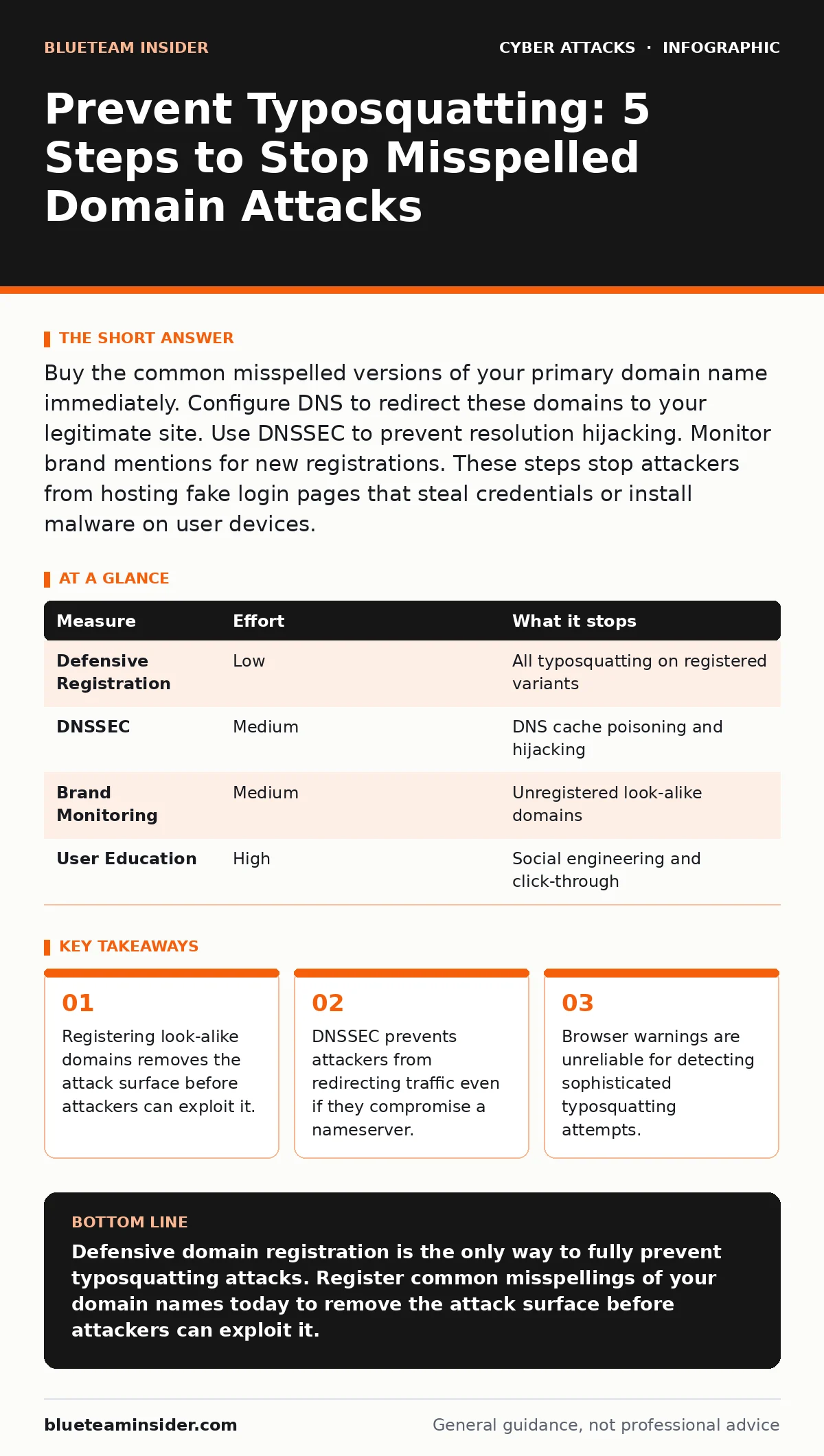
Buy the common misspelled versions of your primary domain name immediately. Configure DNS to redirect these domains to your legitimate site. Use DNSSEC to prevent resolution hijacking. Monitor brand mentions for new registrations. These steps stop attackers from hosting fake login pages that steal credentials or install malware on user devices.
Why Typosquatting Works Against Human Memory
Typosquatting relies on the fact that human memory is imperfect. You type a familiar website address, but your fingers make a small error. The attacker has already registered that misspelled domain. Your browser connects to their server instead of yours. They display a convincing copy of your login page. You enter your credentials. The attacker captures them. This method requires no technical skill from the attacker. It only requires patience and a list of common keyboard mistakes. The risk exists because domain registration is cheap and anonymous. Attackers register hundreds of variations at once. They wait for users to make a mistake.
The Only Complete Fix: Defensive Registration
The most effective measure against typosquatting is defensive domain registration. You buy the common misspellings of your primary domain. This includes swapped keys, missing letters, and added characters. You also buy common top-level domain variations. If your site is example.com, you buy example.net, example.org, and example.co. You configure these domains to redirect to your main site. This removes the opportunity for an attacker to host a fake site. It costs money annually, but it eliminates the risk. You pay a small fee to prevent a large breach. This is the only method that stops the attack at the source. It does not rely on user behavior or browser filters.
Strengthening DNS with DNSSEC
Domain Name System Security Extensions (DNSSEC) adds a digital signature to your domain records. This signature proves that the DNS response comes from the authoritative source. It prevents attackers from intercepting DNS queries and returning a fake IP address. This technique stops cache poisoning attacks. It does not stop typosquatting if the attacker owns the misspelled domain. It does stop them from hijacking your legitimate domain name. You must enable DNSSEC at your registrar and your nameserver. This adds a layer of cryptographic verification. It ensures that the address you receive is the address you requested. It protects the integrity of the resolution process.
What Does Not Work: Relying on Browser Warnings
Many users believe that modern browsers will warn them about typosquatting sites. This belief is dangerous. Browsers check for known malicious domains. They do not check for look-alike domains that are newly registered. A typosquatting site is often clean when first launched. It has no malware. It has no reported phishing links. The browser sees it as a normal website. The attacker waits days or weeks before activating the malicious content. By then, the site may be added to threat lists, but the damage is done. You cannot rely on browser safety features to catch this specific threat. You must assume the browser will not warn you.
Detecting New Threats with Brand Monitoring
You cannot register every possible variation. There are thousands of combinations. You need a way to find new registrations quickly. Brand monitoring services scan the domain registry for new entries. They look for similarities to your registered names. They alert you when a match is found. You can then file a complaint with the registrar. Many registrars have policies against abusive registrations. You can request the domain be suspended or transferred. This is a reactive measure. It does not prevent the initial registration. It reduces the window of exposure. You catch the attacker before they build a large audience. This requires ongoing attention and resources.
Educating Users on Verification Techniques
Users must learn to verify the domain name manually. This is difficult because attackers make the differences subtle. They use characters that look identical in certain fonts. For example, the Cyrillic letter 'а' looks like the Latin letter 'a'. This is known as IDN homograph attacks. Users should hover over links to see the actual destination.
They should check the beginning and end of the domain name carefully. They should avoid clicking links in emails or messages. They should type the address manually if they are unsure. This training takes time. It does not eliminate the risk. It reduces the success rate of social engineering attacks. It complements technical controls. It addresses the human factor in security.
The Hidden Cost of Inaction
Ignoring typosquatting creates a false sense of security. You believe your security tools are sufficient. You do not see the value in spending money on domain registration. You wait for an incident to occur. When it does, you lose customer trust. You face legal liability. You spend more on incident response than you would have on prevention. The cost of registration is predictable. The cost of a breach is not. You must weigh these costs carefully. You must allocate budget for defensive registration. You must treat it as a core security control. It is not an optional add-on. It is a necessary expense for any organization with an online presence.
| Measure | Effort | What it stops |
|---|---|---|
| Defensive Registration | Low | All typosquatting on registered variants |
| DNSSEC | Medium | DNS cache poisoning and hijacking |
| Brand Monitoring | Medium | Unregistered look-alike domains |
| User Education | High | Social engineering and click-through |
Integrating with Broader Security Strategy
Typosquatting is often the first step in a larger attack. Attackers use the fake site to harvest credentials. They then use these credentials for account takeover. They may launch further attacks against your network. This connects to broader concepts like phishing and man-in-the-middle attacks. You must treat typosquatting as part of your overall identity security. It is not an isolated issue. It requires coordination with your incident response plans. You must have a process for handling compromised credentials. You must notify users if their data is stolen. You must reset passwords and revoke sessions. This holistic approach reduces the impact of any single failure.
Closing Checklist for Immediate Action
You can reduce your risk today with these three steps. First, list all your primary domain names. Second, identify the 10 most common misspellings for each. Third, register these domains immediately. Configure them to redirect to your main site. This takes less than an hour. It provides immediate protection. It stops the most likely attacks. You can expand this list later. Start with the obvious errors. Do not delay. Attackers are already registering these names. You must act before they do.
- Register the top 10 common misspellings of your primary domain.
- Enable DNSSEC on all your primary and defensive domains.
- Subscribe to a domain monitoring alert for your brand name.
Key takeaways
- Registering look-alike domains removes the attack surface before attackers can exploit it.
- DNSSEC prevents attackers from redirecting traffic even if they compromise a nameserver.
- Browser warnings are unreliable for detecting sophisticated typosquatting attempts.
Defensive domain registration is the only way to fully prevent typosquatting attacks. Register common misspellings of your domain names today to remove the attack surface before attackers can exploit it.
Frequently asked questions
How do I know which misspellings to register?
Focus on adjacent keys on the keyboard, missing vowels, and swapped letters. Common top-level domains like .net and .org are also high priority. Use a typosquatting generator tool to find variations.
Can I transfer a typosquatted domain from an attacker?
You can file a complaint with the registrar or use legal action. Success depends on the jurisdiction and the specific policies of the registrar. It is often faster and cheaper to just register your own variations.
Does HTTPS protect me from typosquatting?
No. HTTPS encrypts the connection but does not verify the legitimacy of the domain name. Attackers can obtain valid SSL certificates for fake domains. The padlock icon does not mean the site is safe.
How often should I renew defensive domains?
You must renew them annually, just like your primary domain. If a defensive domain expires, an attacker can register it immediately. Set up auto-renewal to prevent accidental expiration.
How this guide was produced: written by the BlueTeam Insider editorial team with AI assistance, checked against the public references listed below, and reviewed when the facts change. See our editorial policy or report an error.