How Out-of-Band Patches Work: Mechanisms, Risks, and Application
Out-of-band patches bypass standard update cycles to fix critical flaws, creating a maintenance gap that can destabilize systems if not tracked separately from routine updates.
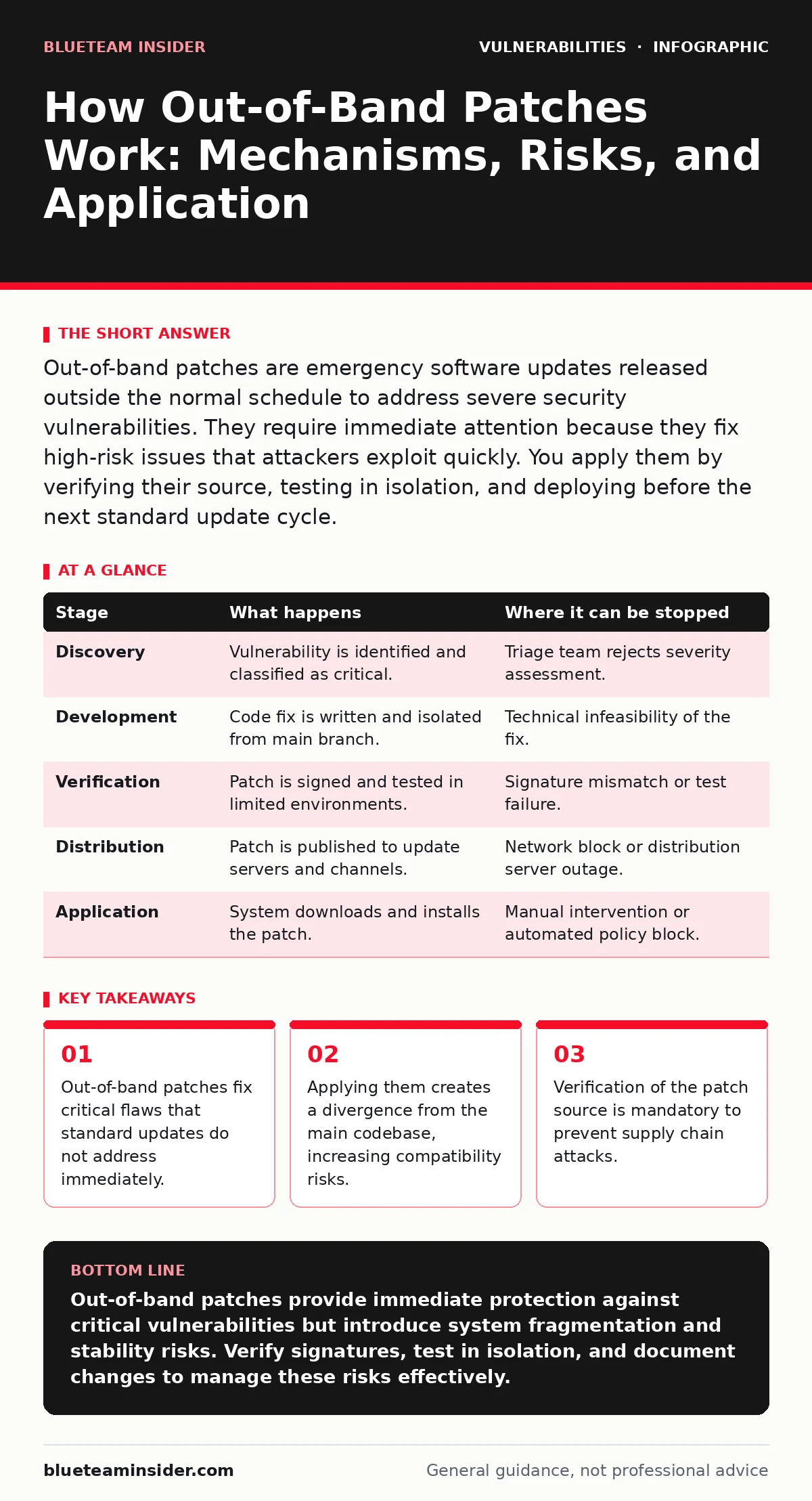
Out-of-band patches are emergency software updates released outside the normal schedule to address severe security vulnerabilities. They require immediate attention because they fix high-risk issues that attackers exploit quickly. You apply them by verifying their source, testing in isolation, and deploying before the next standard update cycle.
The Emergency Release Mechanism
Standard software updates follow a predictable rhythm. Developers bundle fixes, feature improvements, and minor corrections into releases that occur monthly or quarterly. This rhythm allows organizations to plan maintenance windows and test changes thoroughly. Out-of-band patches break this rhythm. They are released solely to address a specific, high-severity vulnerability that has been discovered and is being actively exploited or is imminent.
These patches are not comprehensive. They contain only the code changes necessary to close the specific security hole. Because they skip the usual integration testing phases, they carry a higher risk of introducing new bugs or conflicts with existing configurations. You must treat them as surgical interventions rather than routine maintenance.
Stage 1: Discovery and Triage
The process begins when a vulnerability is identified. This might happen through internal auditing, external researchers, or analysis of attack traffic. Security teams assess the severity based on the exploitability and impact. If the flaw allows remote code execution without authentication, it qualifies for an out-of-band response.
At this stage, the decision is made to bypass the standard release train. The development team isolates the fix. They do not wait for the next scheduled feature freeze. This urgency means the patch receives less scrutiny than a standard release. The trade-off is speed versus stability. You gain immediate protection against a known threat but accept a higher probability of unintended side effects.
Stage 2: Verification and Signing
Before the patch reaches you, it must be cryptographically signed. This signature proves the code originates from the legitimate vendor and has not been altered in transit. Without this verification, you cannot distinguish a legitimate emergency fix from a malicious payload designed to look like a patch.
Imagine a scenario where an attacker intercepts the update channel. If you apply an unsigned patch, you may be installing backdoors rather than fixes. Always verify the digital signature using the vendor’s public key. This step is non-negotiable. It protects against supply chain attacks where the distribution mechanism itself is compromised.
| Stage | What happens | Where it can be stopped |
|---|---|---|
| Discovery | Vulnerability is identified and classified as critical. | Triage team rejects severity assessment. |
| Development | Code fix is written and isolated from main branch. | Technical infeasibility of the fix. |
| Verification | Patch is signed and tested in limited environments. | Signature mismatch or test failure. |
| Distribution | Patch is published to update servers and channels. | Network block or distribution server outage. |
| Application | System downloads and installs the patch. | Manual intervention or automated policy block. |
Stage 3: Isolated Testing
You should never apply an out-of-band patch directly to production systems. The lack of full regression testing means the patch might conflict with other software components. Deploy the patch to a staging environment that mirrors your production setup. Monitor this environment for crashes, performance degradation, or unexpected behavior.
This step reveals hidden costs. A patch for a use-after-free vulnerabilities might fix the memory leak but break a legacy application that relies on the previous memory behavior. If the staging test fails, you must hold the patch until a revised version is available. This delay leaves you exposed, but applying a broken patch can cause downtime that is worse than the vulnerability itself.
Stage 4: Controlled Deployment
Once testing confirms stability, you deploy the patch to production. Use a phased rollout. Apply it to a small subset of systems first. Monitor these systems closely for any anomalies. If issues arise, you can roll back the change before it affects the entire infrastructure.
This controlled approach mitigates the risk of widespread failure. It also allows you to validate that the patch actually resolves the vulnerability. You can run scans or penetration tests against the patched systems to confirm the exploit no longer works. This verification step is often skipped due to urgency, but it is critical for ensuring the fix is effective.
See also: What Is Computer Worms: How They Spread and How to Stop Them · Vulnerability Scanning Best Practices for Accurate Risk Data
Stage 5: Documentation and Tracking
Out-of-band patches create a divergence from the standard codebase. Your systems are now running a version of software that does not match any official release tag. You must document this state clearly. Record the patch ID, the date of application, and the specific vulnerability it addresses.
This documentation is vital for future updates. When the next standard release arrives, it may include the same fix, or it may conflict with your out-of-band patch. Without clear records, you risk applying duplicate fixes or incompatible updates. This tracking also helps in auditing and compliance reviews, proving that you addressed the vulnerability promptly.
The Hidden Cost of Fragmentation
The biggest risk of out-of-band patches is configuration drift. As you apply emergency fixes, your environment becomes unique. It no longer matches the vendor’s standard configuration. This fragmentation makes future upgrades difficult. You may need to manually reconcile changes or wait for a standard release that includes your emergency fix.
This situation resembles the challenges seen with firmware vulnerabilities, where patches are rare and often require hardware-specific interventions. The lack of regular updates means each patch becomes a significant event. You must plan for this fragmentation in your long-term maintenance strategy. Regularly consolidating out-of-band patches into standard releases helps reduce this drift.
Integration with Standard Updates
Eventually, the out-of-band fix will be included in a standard release. You must determine whether to stay on the patched version or upgrade to the new standard release. Upgrading ensures you receive other security fixes and improvements included in the standard package. However, it requires re-testing and potential reconfiguration.
If you stay on the patched version, you miss out on other improvements and may face compatibility issues with new software. This decision requires careful planning. Coordinate with your development and operations teams to schedule the transition. This ensures a smooth move back to the standard codebase, reducing the risk of fragmentation.
Related Security Considerations
Out-of-band patches often address vulnerabilities that are difficult to fix through configuration alone. For instance, API vulnerabilities may require code changes that cannot be mitigated by firewall rules. Similarly, server-side template injection flaws often need direct code corrections. Understanding the nature of the vulnerability helps you assess the urgency and impact of the patch.
In some cases, patches may be unavailable or delayed. This is common with VPN appliance vulnerabilities, where hardware limitations restrict update options. In such scenarios, you may need to implement compensating controls, such as network segmentation or access restrictions, until a patch is available. These controls reduce the attack surface but do not eliminate the vulnerability.
Maintaining a Secure Posture
Out-of-band patches are a necessary tool in your security arsenal. They provide rapid protection against critical threats. However, they come with costs in terms of stability, complexity, and maintenance. You must balance the urgency of the fix with the risk of introducing new issues.
By following a structured process of verification, testing, and documentation, you can mitigate these risks. Treat out-of-band patches as exceptions, not the norm. Aim to reduce the need for them by improving your development and testing practices. This proactive approach helps maintain a stable and secure environment.
Key takeaways
- Out-of-band patches fix critical flaws that standard updates do not address immediately.
- Applying them creates a divergence from the main codebase, increasing compatibility risks.
- Verification of the patch source is mandatory to prevent supply chain attacks.
Out-of-band patches provide immediate protection against critical vulnerabilities but introduce system fragmentation and stability risks. Verify signatures, test in isolation, and document changes to manage these risks effectively.
Frequently asked questions
How do I know if a patch is out-of-band?
Out-of-band patches are released outside the normal schedule and are usually announced with urgent advisories. They often have distinct version numbers or patch IDs that differ from standard releases.
Can I automate the application of out-of-band patches?
Automation is risky for out-of-band patches due to their higher instability. Manual verification and testing are recommended to ensure compatibility and effectiveness before deployment.
What if a patch breaks my system?
Have a rollback plan ready before applying the patch. If issues arise, revert to the previous version immediately. Isolate the affected systems to prevent further impact while investigating the cause.
How often do out-of-band patches occur?
Frequency varies by vendor and product. Critical infrastructure and widely used software may receive them more often. Monitor vendor security advisories to stay informed about urgent releases.
How this guide was produced: written by the BlueTeam Insider editorial team with AI assistance, checked against the public references listed below, and reviewed when the facts change. See our editorial policy or report an error.