Cloud Ransomware Risks and Protection Strategies for Small Teams
Most cloud breaches fail not because of weak encryption, but because attackers exploit overly broad permissions that allow them to encrypt data without touching the underlying infrastructure.
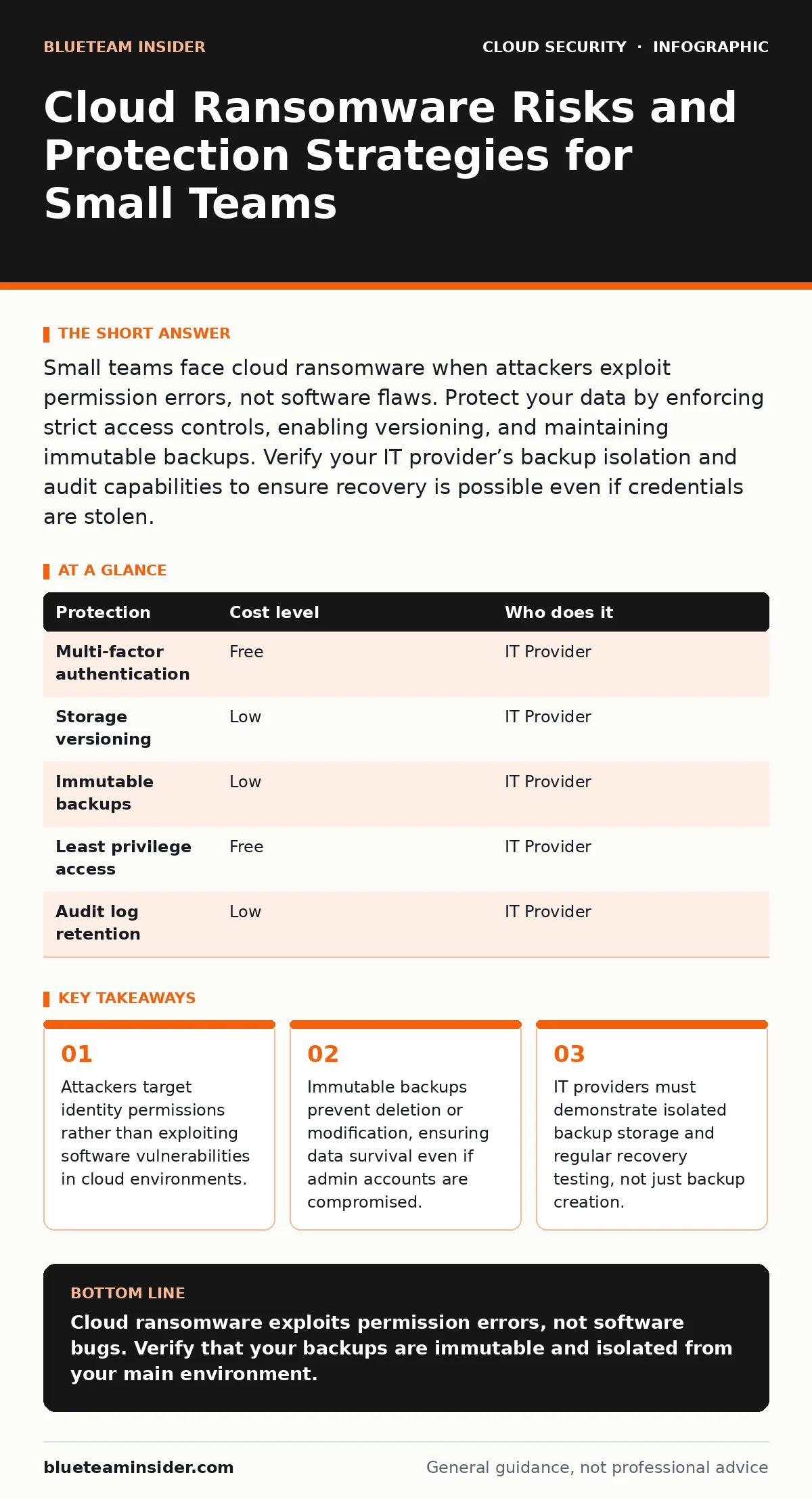
Small teams face cloud ransomware when attackers exploit permission errors, not software flaws. Protect your data by enforcing strict access controls, enabling versioning, and maintaining immutable backups. Verify your IT provider’s backup isolation and audit capabilities to ensure recovery is possible even if credentials are stolen.
The Illusion of Cloud Safety
Many small organizations believe that moving to the cloud eliminates the need for traditional cybersecurity. This belief is dangerous. The cloud shifts responsibility for infrastructure security to the provider, but it places the responsibility for data access and identity management squarely on you. If an attacker gains access to a user account, they inherit the permissions of that user.
In a local network, an attacker must breach the perimeter to reach your files. In the cloud, the perimeter is your identity. If you grant a user full administrative rights to a storage bucket, that user can delete, encrypt, or exfiltrate all data within it. The cloud provider’s security protects the physical servers and the virtualization layer, but it does not protect you from your own permission settings.
This shift means that traditional antivirus software is insufficient. You cannot install an endpoint detection tool on a cloud storage service. Your defense must be architectural, focusing on how data is accessed, modified, and stored. Understanding this distinction is the first step in securing your environment against ransomware that targets cloud-native services.
Why Small Teams Are Primary Targets
Small organizations are exposed because they often lack dedicated security staff. They rely on default configurations provided by cloud platforms. These defaults are designed for ease of use, not for security. A storage bucket created for public web assets might remain publicly accessible even after the website is taken down.
Attackers automate scans for these misconfigurations. They do not need to hack your firewall; they simply look for open doors. A single employee with excessive privileges can become the entry point. If that employee’s credentials are stolen via phishing, the attacker gains immediate access to sensitive data.
The financial pressure on small teams exacerbates the risk. Security is often viewed as a cost center rather than a business enabler. As a result, critical controls like multi-factor authentication or detailed audit logging are sometimes disabled to save money or reduce friction. This creates a fragile environment where a single mistake can lead to catastrophic data loss.
Furthermore, small businesses often lack visibility into their cloud resources. They may not know all the services they are using or who has access to them. This lack of inventory makes it difficult to detect unauthorized changes or to respond quickly when a breach occurs.
The Mechanics of Cloud Encryption Attacks
Ransomware in the cloud operates differently than on-premises malware. Instead of installing a virus on a computer, the attacker uses legitimate API calls to encrypt or delete data. They use the stolen credentials to interact with the cloud service just as a legitimate user would.
This method bypasses traditional network security controls. The traffic looks like normal user activity. The attacker uploads encrypted versions of files and deletes the originals. Or, they change the permissions of the storage container to deny access to everyone, including the administrators.
The speed of this attack is a significant factor. Cloud APIs allow for bulk operations. An attacker can encrypt terabytes of data in minutes. By the time you notice the issue, the damage may already be done. The attacker then demands payment to restore access or to provide the decryption key.
It is critical to understand that the cloud provider cannot decrypt your data if you use customer-managed keys. If the attacker steals your encryption keys, they can decrypt and re-encrypt your data. This is why key management is a critical component of cloud security. For more on managing these keys, see our guide on bring your own key encryption.
Low-Cost Protections That Actually Work
You do not need expensive security tools to protect your cloud data. Many effective controls are built into cloud platforms and are free or low-cost. The challenge is enabling and configuring them correctly. These measures focus on limiting damage and ensuring recoverability.
| Protection | Cost level | Who does it |
|---|---|---|
| Multi-factor authentication | Free | IT Provider |
| Storage versioning | Low | IT Provider |
| Immutable backups | Low | IT Provider |
| Least privilege access | Free | IT Provider |
| Audit log retention | Low | IT Provider |
Multi-factor authentication adds a second layer of verification to logins. Even if an attacker steals a password, they cannot access the account without the second factor. This stops the majority of credential-based attacks. Ensure that MFA is required for all users, especially those with administrative privileges.
Storage versioning keeps previous copies of files. If an attacker encrypts a file, you can revert to a previous, unencrypted version. This feature is often available at a low cost in cloud storage services. It provides a safety net against accidental deletion or malicious modification.
Immutable backups are copies of data that cannot be changed or deleted for a set period. This prevents attackers from deleting your backups after encrypting your live data. You must configure these backups to be isolated from the main environment. An attacker with access to your main account should not have access to the backup storage.
For a deeper look at how permissions can be abused, review our guide on cloud privilege escalation. Understanding how attackers move through your system helps you block their path.
What to Ask Your IT Provider
If you outsource your cloud management, you must verify that your provider follows security best practices. Do not assume they are secure. Ask specific questions about their processes and controls. Their answers will reveal their level of expertise and commitment to your security.
- How are backups isolated from the production environment? Ensure backups are stored in a separate account or region that the attacker cannot access.
- Do you perform regular recovery tests? Backups are useless if they cannot be restored. Ask for evidence of successful recovery drills.
- How do you manage user permissions? They should follow the principle of least privilege, granting only the access necessary for each role.
- What is your incident response plan? They should have a clear process for detecting, containing, and recovering from a breach.
- Do you enable audit logging for all resources? Logs provide visibility into who accessed what and when. See our guide on cloud audit logs for details on what to look for.
These questions help you assess the provider’s maturity. A provider who cannot answer these questions clearly is not ready to manage your cloud security. You need a partner who proactively identifies risks and implements controls.
For a broader view of your security posture, consider a cloud security assessments. This process identifies gaps in your configuration and provides a roadmap for improvement.
Avoiding Hidden Costs and Complexity
Implementing security controls can introduce complexity. Managing multiple accounts, keys, and permissions requires effort. Small teams often struggle with this overhead. The goal is to balance security with usability.
One hidden cost is the time required to review and update permissions. As your team grows, you must regularly audit access rights. Former employees should have their access revoked immediately. Unused resources should be decommissioned. See our guide on orphaned cloud resources to learn how to identify and clean up these liabilities.
Another cost is the potential for reduced productivity. Strict security controls can slow down workflows. Employees may find it frustrating to request access or use multi-factor authentication. You must communicate the reasons for these controls to gain buy-in.
Hybrid environments add another layer of complexity. If you use both cloud and on-premises systems, you must ensure consistent security policies across both. See our guide on hybrid cloud security for strategies to manage this complexity.
For organizations looking to standardize their cloud setup, a cloud landing zones can provide a secure baseline. This approach ensures that new resources are created with security controls already in place.
Finally, ensure your cloud compliance meets industry standards. This involves regular audits and documentation. See our guide on cloud compliance for details on maintaining these standards.
Key takeaways
- Attackers target identity permissions rather than exploiting software vulnerabilities in cloud environments.
- Immutable backups prevent deletion or modification, ensuring data survival even if admin accounts are compromised.
- IT providers must demonstrate isolated backup storage and regular recovery testing, not just backup creation.
Cloud ransomware exploits permission errors, not software bugs. Verify that your backups are immutable and isolated from your main environment.
Frequently asked questions
Can cloud providers recover my data after a ransomware attack?
Cloud providers protect the infrastructure, but they do not recover your data if you lose access due to misconfiguration or credential theft. You are responsible for your own backups and access management.
Is multi-factor authentication enough to stop cloud ransomware?
MFA stops credential theft, but it does not stop attacks that exploit weak permissions
How this guide was produced: written by the BlueTeam Insider editorial team with AI assistance, checked against the public references listed below, and reviewed when the facts change. See our editorial policy or report an error.