Container Image Scanning: Benefits, Limits, and When It Fails
Scanning images reveals known code flaws but misses runtime attacks, meaning your security posture depends on how you handle what the scanner ignores.
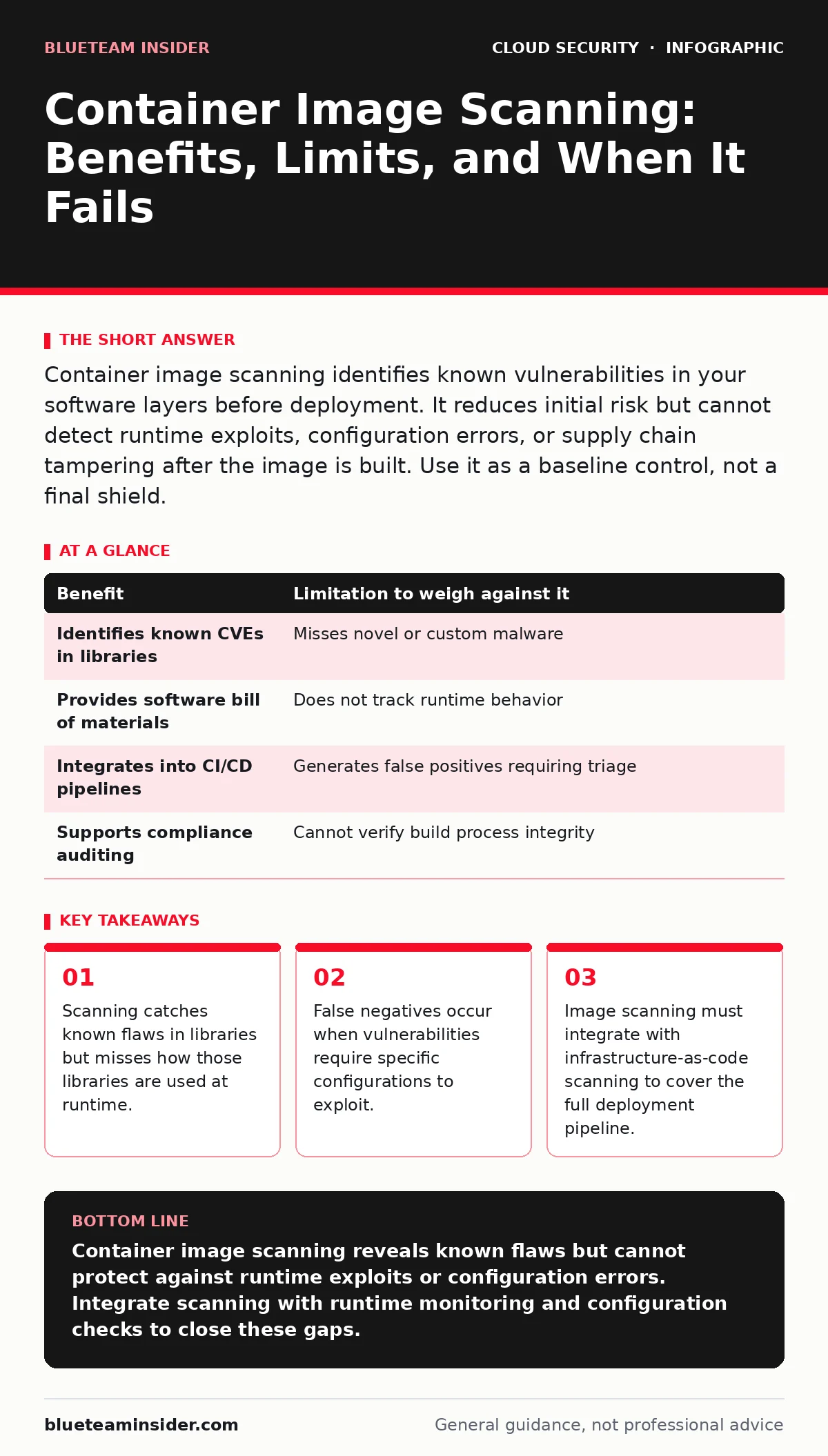
Container image scanning identifies known vulnerabilities in your software layers before deployment. It reduces initial risk but cannot detect runtime exploits, configuration errors, or supply chain tampering after the image is built. Use it as a baseline control, not a final shield.
What Container Image Scanning Actually Detects
Container image scanning analyzes the file system layers of your container images against databases of known vulnerabilities. The process identifies outdated libraries, unpatched operating system components, and exposed secrets stored in the image metadata. You gain visibility into the software bill of materials for every artifact you deploy. This visibility allows you to prioritize fixes based on the severity of known flaws. The scanner compares your image contents against public vulnerability databases. It flags any package version that has a recorded security issue. This mechanism works reliably for static code flaws that exist within the image itself.
The output is a list of potential issues. Each issue includes a severity rating and a reference to the vulnerability identifier. You can use this data to block deployments or request updates from developers. The process is automated and runs during the build phase. It prevents known bad code from entering your production environment. This reduces the initial attack surface significantly. You know exactly what software is running inside your containers. This transparency is the primary value of the scanning process.
The Hidden Costs of False Positives
Not every flagged vulnerability is a real threat to your system. Many vulnerabilities require specific conditions to exploit. These conditions might include network access, user privileges, or specific software configurations. Your container might not expose the vulnerable service to any network interface. The vulnerable library might be present but never called by your application code. Scanning tools often cannot distinguish between reachable and unreachable code. This leads to a high volume of false positives. Developers spend time investigating issues that pose no actual risk. This noise reduces trust in the security process.
You must triage findings based on context. A vulnerability in a library that is never executed is not an immediate risk. However, ignoring it entirely creates technical debt. If the code path becomes active later, the vulnerability becomes active too. You need a policy that defines acceptable risk levels. This policy should consider the environment, the exposure, and the exploitability. Manual review is often required to make these distinctions. This adds labor to your security operations.
Runtime Gaps That Scanners Miss
Image scanning provides a snapshot of the container at build time. It does not monitor the container while it runs. Attackers can exploit runtime behaviors that are not visible in the static image. They might inject malicious code into the running process. They might manipulate environment variables to change behavior. They might exploit race conditions that only appear under load. These threats are invisible to image scanners. You need runtime protection to catch these attacks. Without it, a clean image can still be compromised in production.
Imagine a container that starts with a clean image. An attacker gains access to the host machine. They modify the running process of the container. The image file remains unchanged. A subsequent scan would show no issues. The compromise is already active. This scenario highlights the limitation of static analysis. You must complement scanning with runtime monitoring. This ensures you detect anomalies that occur after deployment.
Supply Chain Risks Beyond the Image
The image is only one part of the supply chain. The build process itself can be compromised. An attacker might inject malicious code during the build. This code might not be flagged by standard vulnerability databases. It might be new or custom malware. Image scanners rely on known signatures. They cannot detect novel threats effectively. You need to secure the build environment itself. This includes verifying the integrity of build tools and dependencies. You should use signed images to ensure authenticity. This prevents tampering between the build and deployment stages.
Consider the source of your base images. If the base image is compromised, your derived images are too. You must verify the provenance of all components. This requires a chain of trust from code commit to deployment. Image scanning alone does not provide this chain. You need additional controls to verify integrity. These controls include signing and verification steps. They ensure that the image you deploy is the image you built.
When Scanning Adds Real Value
Container image scanning is worth implementing when you have a large number of containers. It scales better than manual review. It provides consistent checks across all deployments. You benefit most when you integrate scanning into your CI/CD pipeline. This ensures that every image is checked before it reaches production. It creates a gate that blocks known vulnerabilities. This is particularly useful for organizations with strict compliance requirements. It provides audit trails for security reviews. It helps demonstrate due diligence in security practices.
| Benefit | Limitation to weigh against it |
|---|---|
| Identifies known CVEs in libraries | Misses novel or custom malware |
| Provides software bill of materials | Does not track runtime behavior |
| Integrates into CI/CD pipelines | Generates false positives requiring triage |
| Supports compliance auditing | Cannot verify build process integrity |
You also gain value when you use scanning to prioritize patches. It tells you which libraries need updating. This helps developers focus on the most critical issues. It reduces the time to remediate known flaws. The data can feed into risk management decisions. You can make informed choices about accepting risk. This is better than ignoring vulnerabilities entirely. Scanning gives you the data to make those choices.
When Scanning Is Not Enough
Scanning is not enough when you rely on it as your only security control. It does not protect against configuration errors. It does not stop privilege escalation attacks. You need to address these risks separately. For example, running containers as root is a configuration issue. Scanners might not flag this if it is not a known vulnerability. You need configuration checks to catch this. You should integrate these checks with infrastructure-as-code scanning. This ensures that the deployment configuration is also secure.
Imagine a container with no known vulnerabilities. It is configured to run with full host access. An attacker exploits this configuration to escape the container. The image was clean, but the deployment was insecure. This scenario shows that image scanning is incomplete. You must secure the entire deployment stack. This includes the container runtime, the orchestrator, and the host. Each layer needs its own set of controls. Relying on image scanning alone leaves gaps.
Integrating With Broader Security Practices
To get the most from image scanning, integrate it with other security practices. Combine it with runtime monitoring to catch post-deployment attacks. Use it alongside infrastructure-as-code scanning to secure configurations. Ensure your cloud incident response plan includes steps for compromised containers. This prepares you for when defenses fail. Review your cloud privilege escalation paths regularly. Minimize the permissions granted to containers. This reduces the impact of a successful attack.
Consider your hybrid cloud security strategy. Containers often move between environments. Ensure scanning policies are consistent across all environments. This prevents gaps in coverage. Align your scanning efforts with cloud compliance requirements. Use the data to satisfy audit needs. This makes the security investment more efficient. You address multiple goals with a single control. This integration maximizes the value of your security tools.
Check your orphaned cloud resources regularly. Old containers might still be running. They might contain outdated software. Scanning these resources ensures they are also secure. This prevents neglected assets from becoming entry points. Regular cleanup reduces the attack surface. It ensures that only active, scanned containers are running. This discipline supports a stronger security posture.
Review your MFA for cloud accounts policies. Ensure that access to container registries is protected. This prevents unauthorized uploads of malicious images. Secure the endpoints that interact with containers. This adds another layer of defense. Security is a chain of controls. Each link strengthens the overall position. Image scanning is one link in that chain.
Key takeaways
- Scanning catches known flaws in libraries but misses how those libraries are used at runtime.
- False negatives occur when vulnerabilities require specific configurations to exploit.
- Image scanning must integrate with infrastructure-as-code scanning to cover the full deployment pipeline.
Container image scanning reveals known flaws but cannot protect against runtime exploits or configuration errors. Integrate scanning with runtime monitoring and configuration checks to close these gaps.
Frequently asked questions
Does container image scanning replace runtime security?
No, scanning only checks the static image. Runtime security monitors behavior during execution to catch active attacks.
How do I handle false positives from scanners?
Triage findings based on context and exploitability. Ignore unreachable code paths but track them for future changes.
Can scanners detect new malware in images?
Standard scanners rely on known signatures. They struggle with novel or custom malware without behavioral analysis.
Is scanning enough for compliance requirements?
Scanning provides evidence of due diligence. Most standards require additional controls like runtime monitoring and access management.
How this guide was produced: written by the BlueTeam Insider editorial team with AI assistance, checked against the public references listed below, and reviewed when the facts change. See our editorial policy or report an error.