Polymorphic Malware Response: Stop Mutation and Recover Systems
Polymorphic malware alters its code signature with every infection, rendering static signature databases useless and demanding behavioral containment strategies.
Isolate the network immediately to stop lateral movement. Do not reboot infected machines, as this may trigger encryption or data destruction. Capture memory for forensic analysis before powering down. Restore systems only from verified, offline backups after confirming the malware variant is fully removed from the environment.
The First Hour: Containment and Preservation
When you suspect polymorphic malware, your primary goal is to stop the spread without alerting the attacker to your discovery. Polymorphic malware changes its cryptographic hash with each infection cycle. This means every copy looks different to traditional security tools. If you rely solely on signature matching, you will miss the majority of the infection.
You must act quickly but calmly. Panic leads to errors that compromise the investigation. Follow this checklist to secure the environment before attempting removal.
- Disconnect the infected machine from the network physically or via software switch.
- Disable Wi-Fi and Bluetooth adapters to prevent wireless lateral movement.
- Do not log into the machine if possible; use a separate, clean device to manage the incident.
- Document the exact time of detection and any visible symptoms.
- Identify other systems that communicated with the host in the last 24 hours.
Imagine a scenario where a single workstation shows unusual CPU usage. You assume it is a resource leak. In reality, the malware is actively mutating its code to evade detection. If you reboot the machine to "fix" the performance issue, you may trigger the payload that destroys local data. The malware uses the reboot event as a signal to execute its final stage.
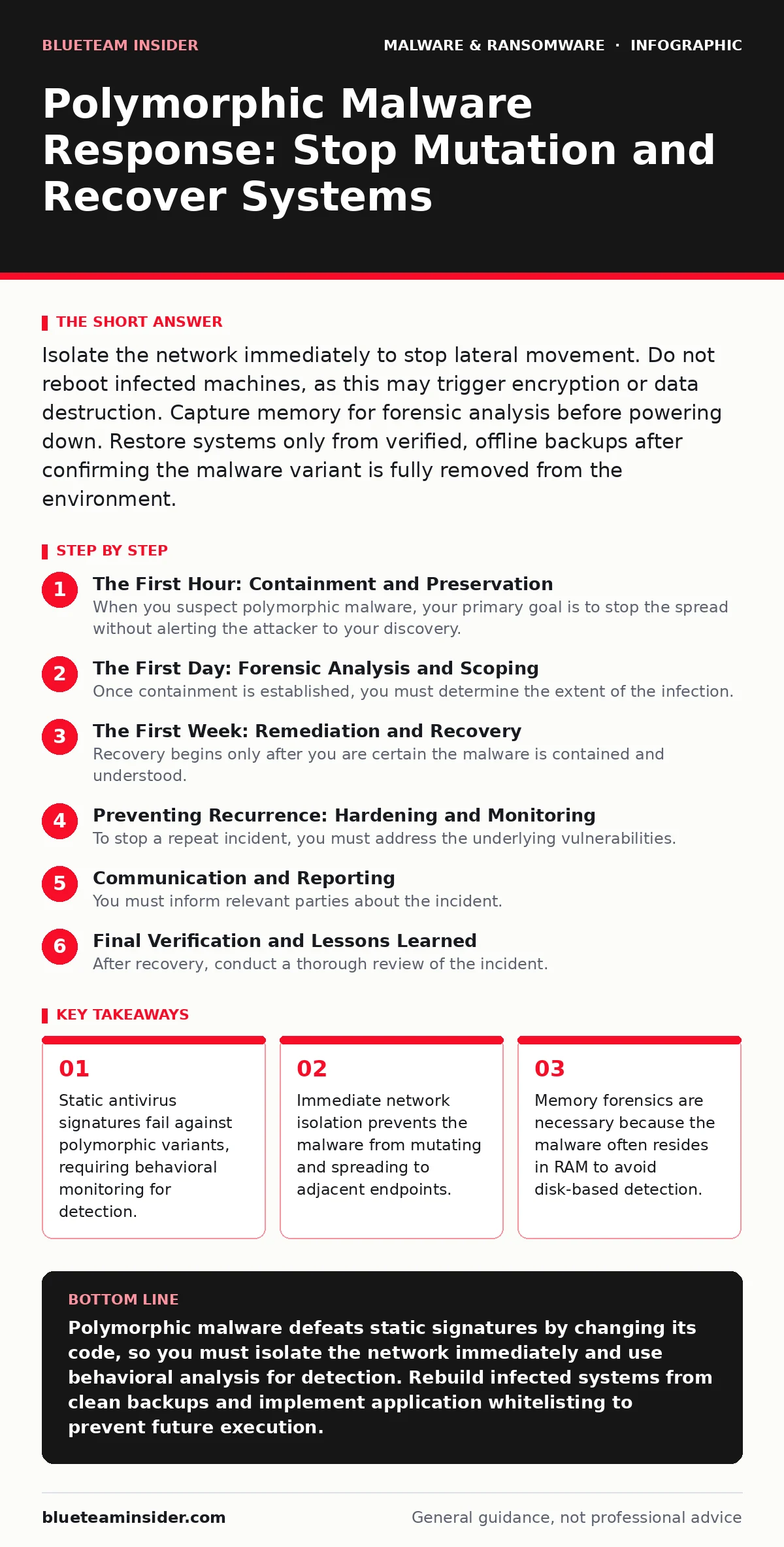
The First Day: Forensic Analysis and Scoping
Once containment is established, you must determine the extent of the infection. Polymorphic malware often uses a rootkit component to hide its presence. Standard file scans may not reveal the malicious processes. You need to look at behavior, not just files.
Use memory forensic tools to analyze the RAM of the infected system. The malware code exists in memory even if it is not visible on the disk. This allows you to capture the specific variant that infected your network. This data is critical for updating your detection rules. Without this sample, your defenses remain blind to this specific strain.
Check your network logs for unusual outbound connections. Polymorphic malware often communicates with command and control servers using encrypted channels. Look for large data transfers or connections to unfamiliar IP addresses. These indicators help you understand if data has been exfiltrated.
Review the timeline of events. Determine how the malware entered the network. Was it through a phishing email, a compromised supply chain, or remote access tool abuse? Understanding the entry point helps you close the gap. If the malware entered via a legitimate remote support session, you must review all recent remote access logs.
The First Week: Remediation and Recovery
Recovery begins only after you are certain the malware is contained and understood. Do not rush back online. Polymorphic malware can lie dormant for weeks. It waits for a trigger to resume activity. Reconnecting too soon risks reinfection.
Start by rebuilding infected systems from scratch. Do not attempt to clean the operating system. Polymorphic code can hide in system files, drivers, and boot sectors. It is nearly impossible to guarantee complete removal without a fresh install. Use clean, verified backups to restore data. Ensure these backups were created before the infection time.
Update your security infrastructure before reconnecting. Static signatures are insufficient. You must implement heuristic detection methods. These tools analyze program behavior rather than just code structure. They look for actions that are suspicious, such as a document editor trying to modify system registry keys. This approach catches polymorphic variants even if their code has changed.
Test the restored systems in an isolated environment. Monitor them for any signs of abnormal behavior. Check for unexpected network connections or file modifications. Only after a period of observation should you reintegrate them into the main network. This sandbox period allows you to catch any residual components that survived the rebuild.
Preventing Recurrence: Hardening and Monitoring
To stop a repeat incident, you must address the underlying vulnerabilities. Polymorphic malware exploits gaps in your defense-in-depth strategy. You need to strengthen your perimeter and internal controls.
Implement application whitelisting. This security measure allows only approved programs to run. Even if polymorphic malware enters the system, it cannot execute if it is not on the whitelist. This is highly effective against fileless malware and other advanced threats. It shifts the burden from detecting bad code to allowing only good code.
Restrict administrative privileges. Most malware requires elevated permissions to install deeply. By limiting admin rights to only those who need them, you reduce the attack surface. Use privileged access management solutions to monitor and control admin sessions. This makes it harder for malware to escalate privileges and persist.
Regularly audit your software supply chain. Ensure that all third-party tools and updates are verified. Polymorphic malware often hides in legitimate software updates. Verify digital signatures for all installed applications. Remove any unused software to reduce the number of potential entry points.
Communication and Reporting
You must inform relevant parties about the incident. Transparency is key to maintaining trust. Notify your internal stakeholders, including legal, HR, and executive leadership. Provide them with clear, factual updates. Avoid technical jargon. Explain the impact and the steps being taken to resolve the issue.
If customer data was compromised, you may be required to notify regulatory bodies and affected individuals. Follow local laws and regulations regarding breach notification. Delaying this process can lead to legal penalties and reputational damage. Be honest about what happened and what you are doing to fix it.
Share threat intelligence with industry partners. If you have captured a sample of the polymorphic malware, share it with trusted security groups. This helps the broader community defend against the threat. Collaboration strengthens everyone's security posture.
See also: Cloud Incident Response: 8 Practices to Contain Breaches Fast · Incident Response Plan for Ransomware Attack: Stop the Spread
Final Verification and Lessons Learned
After recovery, conduct a thorough review of the incident. Document every step taken. Identify what worked and what failed. Use these insights to improve your incident response plan. Polymorphic malware evolves, and your defenses must evolve with it.
Update your detection rules based on the forensic findings. Ensure your heuristic detection is tuned to catch similar behaviors in the future. Regularly test your incident response procedures with tabletop exercises. This ensures your team is prepared for the next threat.
Security is not a one-time fix. It is a continuous process. Stay informed about emerging threats. Adapt your strategies to address new attack vectors. By learning from each incident, you build a more resilient organization.
Key takeaways
- Static antivirus signatures fail against polymorphic variants, requiring behavioral monitoring for detection.
- Immediate network isolation prevents the malware from mutating and spreading to adjacent endpoints.
- Memory forensics are necessary because the malware often resides in RAM to avoid disk-based detection.
Polymorphic malware defeats static signatures by changing its code, so you must isolate the network immediately and use behavioral analysis for detection. Rebuild infected systems from clean backups and implement application whitelisting to prevent future execution.
Frequently asked questions
Can I clean a computer with polymorphic malware without reinstalling the OS?
It is highly risky and rarely successful. Polymorphic code often embeds itself in system files and boot sectors, making complete removal difficult. A fresh installation is the only reliable method to ensure the system is clean.
Does having antivirus software protect me from polymorphic malware?
Traditional signature-based antivirus may miss polymorphic variants. You need heuristic detection and behavioral monitoring to identify suspicious activities. Layered security with endpoint detection and response is more effective.
How long should I wait before reconnecting a restored system to the network?
Monitor the system in an isolated environment for at least 24 to 48 hours. Watch for any unusual network traffic or file changes. This observation period helps ensure no residual malware components are active.
What is the difference between polymorphic and metamorphic malware?
Polymorphic malware changes its encryption key and code structure but retains the same underlying logic. Metamorphic malware rewrites its own code entirely, changing its logic and structure. Both evade signature-based detection but require different analysis techniques.
How this guide was produced: written by the BlueTeam Insider editorial team with AI assistance, checked against the public references listed below, and reviewed when the facts change. See our editorial policy or report an error.