Linux Malware: How It Works, Who It Targets, and How to Stop It
Linux malware rarely breaks the operating system directly; it exploits human trust in automation and the hidden complexity of open-source package management to gain persistence.

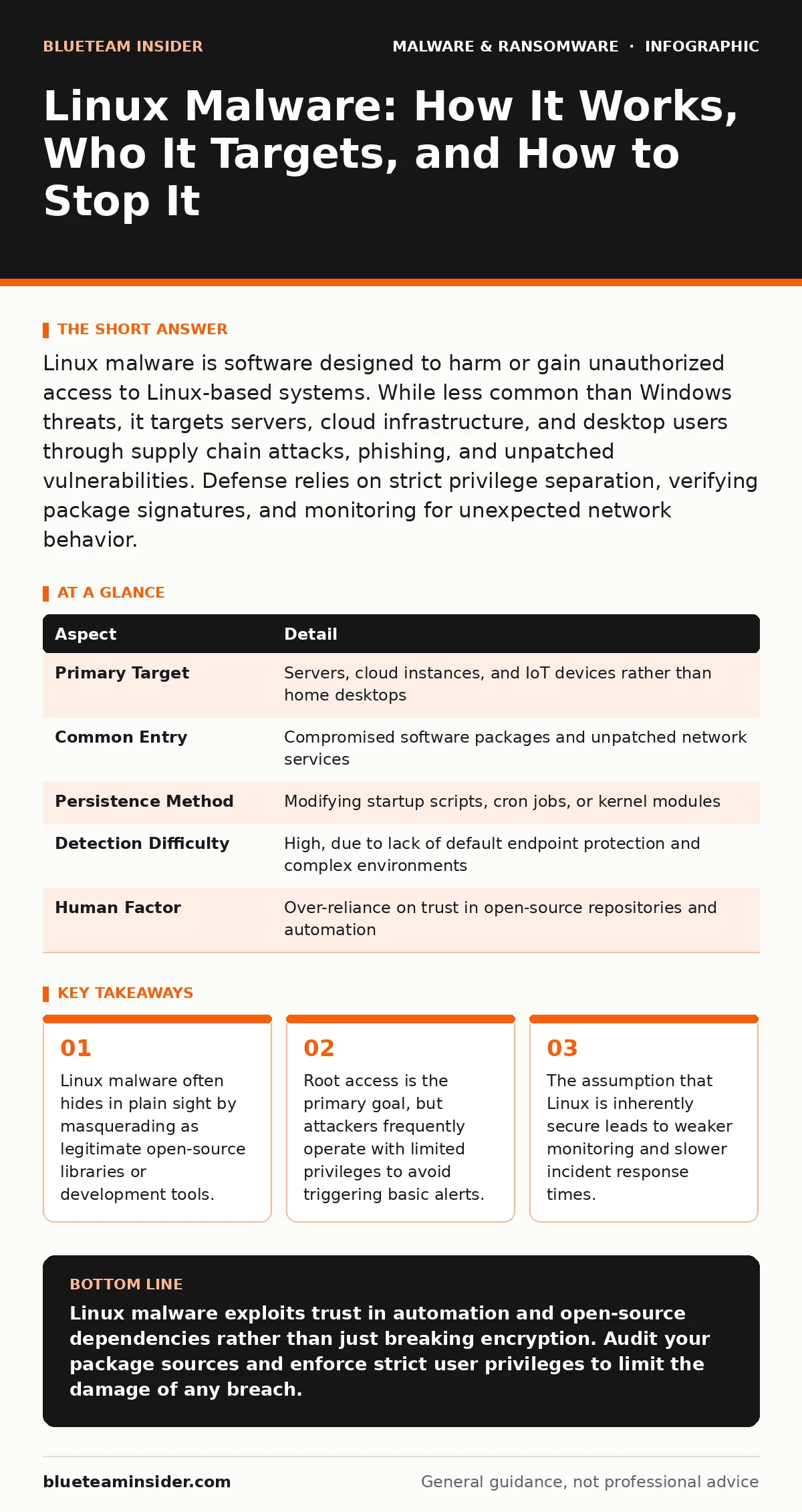
Linux malware is software designed to harm or gain unauthorized access to Linux-based systems. While less common than Windows threats, it targets servers, cloud infrastructure, and desktop users through supply chain attacks, phishing, and unpatched vulnerabilities. Defense relies on strict privilege separation, verifying package signatures, and monitoring for unexpected network behavior.
The Myth of Immunity
Imagine a bank vault that everyone assumes is unbreakable because it sits in a quiet, empty room. Most people never bother to check the windows or the ventilation shafts. This is how many organizations view Linux. For decades, the perception held that Linux was immune to the malware plagues that crippled Windows desktops. This belief created a false sense of security. Attackers noticed this blind spot. They shifted their focus to servers, containers, and cloud infrastructure running Linux, where the potential reward was higher and the defenses were often laxer.
Linux malware is any software designed to disrupt, damage, or gain unauthorized access to a Linux-based system. It ranges from simple scripts that mine cryptocurrency to sophisticated rootkits that hide their presence from the operating system. The definition matters because "malware" is a broad category. It includes viruses, worms, trojans, and spyware. On Linux, the delivery mechanism is often different from what you see on personal computers. Instead of a downloaded executable, it often arrives as a corrupted library file or a misconfigured service.
How Infection Occurs
You might expect a Linux infection to start with a malicious email attachment. While that happens, it is not the primary vector. The most dangerous path is the supply chain. Linux relies heavily on open-source packages. Developers trust these packages because they are community-vetted. Attackers compromise these packages upstream. When you install a legitimate-looking library, you also install the backdoor. This is known as a dependency confusion attack. You are not clicking a bad link; you are running a command that everyone else is running.
Another common entry point is misconfigured services. Linux servers often expose web interfaces, databases, or remote management tools to the internet. If these services have known vulnerabilities and are not patched, automated scanners can exploit them within minutes. This is where ransomware attack chain dynamics come into play. The attacker gains initial access, escalates privileges, and then moves laterally. They do not need to hack you directly if they can hack the service you connect to.
| Aspect | Detail |
|---|---|
| Primary Target | Servers, cloud instances, and IoT devices rather than home desktops |
| Common Entry | Compromised software packages and unpatched network services |
| Persistence Method | Modifying startup scripts, cron jobs, or kernel modules |
| Detection Difficulty | High, due to lack of default endpoint protection and complex environments |
| Human Factor | Over-reliance on trust in open-source repositories and automation |
Who Is Actually at Risk
You do not need to be a large corporation to be a target. Any system running Linux that connects to the internet is a candidate. This includes developers using Ubuntu or Fedora on their workstations, small businesses running web servers, and large enterprises managing Kubernetes clusters. The risk correlates with exposure. A headless server with no graphical interface is less likely to get a drive-by download but is more likely to be scanned for open ports.
Developers are particularly vulnerable. You write code, you test it, and you deploy it. If your development environment is compromised, your builds are compromised. This is the core issue behind clipboard hijackers and other stealthy threats. They do not crash your system. They wait for you to copy a private key or a password and replace it in the clipboard with one the attacker controls. You paste it, thinking it is safe, and hand over your credentials. The malware stays quiet because noise gets it removed.
Common Forms and Behaviors
Linux malware tends to be quieter than its Windows counterparts. It rarely displays pop-up ads or changes your desktop wallpaper. Instead, it looks for resources to exploit. Cryptominers are the most visible form. They use your CPU or GPU to solve mathematical problems for cryptocurrency. You notice them because your fan speeds increase and your system slows down. They are not trying to steal data; they are stealing electricity and compute power.
More dangerous are rootkits. A rootkit modifies the kernel or system libraries to hide processes, files, and network connections. It tricks the operating system into lying to you. When you list running processes, the malware does not appear. This is where heuristic detection becomes necessary. Traditional antivirus relies on signatures, which are fingerprints of known bad files. Heuristics look for behavior. If a script tries to hide itself from the process list, that is suspicious behavior, regardless of whether its signature is known.
What People Usually Get Wrong
There is a persistent belief that if you do not use a graphical user interface, you are safe. This is incorrect. Linux malware does not need a screen to operate. It operates on the command line and in the background. Another mistake is assuming that firewalls stop everything. A firewall controls traffic in and out. It does not stop a user from running a malicious script that was downloaded through an allowed port. If you give a script permission to run, the firewall cannot stop it from acting.
Many administrators also neglect package integrity. They install software from third-party repositories without verifying the digital signature. They trust that the repository is secure. This is a single point of failure. If the repository server is compromised, every user who installs from it becomes infected. This is why Android malware often spreads through unofficial app stores. The mechanism is identical: you trust the source, the source is poisoned, and the damage is done before you even open the app.
See also: Banking Trojans Prevention Checklist for Secure Transactions
Reducing the Risk
Defense starts with least privilege. Do not run services as root. Do not log in as root. Create separate users for different tasks. If a service is compromised, the attacker only gets the privileges of that user, not the entire system. This containment slows down the attacker. It gives you time to detect the breach. You should also disable unnecessary services. Every open port is a door. If you do not need a door, lock it and remove the key.
Verify your software sources. Use only official repositories. Check GPG signatures for packages. This ensures that the code you install has not been tampered with since it was published. Regular updates are non-negotiable. Patching closes the holes that automated scanners look for. You must also monitor for anomalies. Set up alerts for unexpected outbound connections, new user accounts, or changes to critical system files.
The Limits of Protection
No tool provides complete security. Ransomware decryption tools are rare and often ineffective against new variants. Prevention is always better than recovery. You cannot rely on a single solution. You need layers. Network monitoring, endpoint detection, and strict access controls must work together. If one layer fails, the others must hold.
The biggest vulnerability is often the assumption that "it won't happen to me." Linux is powerful and flexible, but that flexibility allows attackers to craft unique payloads that evade generic detection. You must treat your Linux systems with the same caution as any other critical infrastructure. Verify, restrict, and monitor. Assume that someone is trying to get in, and make sure they have to work for it.
Key takeaways
- Linux malware often hides in plain sight by masquerading as legitimate open-source libraries or development tools.
- Root access is the primary goal, but attackers frequently operate with limited privileges to avoid triggering basic alerts.
- The assumption that Linux is inherently secure leads to weaker monitoring and slower incident response times.
Linux malware exploits trust in automation and open-source dependencies rather than just breaking encryption. Audit your package sources and enforce strict user privileges to limit the damage of any breach.
Frequently asked questions
Does Linux need antivirus software?
Traditional antivirus is less effective on Linux due to the variety of distributions and the command-line focus. Instead, use file integrity monitoring and behavioral detection tools tailored for servers and containers.
Can Linux malware spread to Windows systems?
Most Linux malware is specific to the Linux kernel and cannot run on Windows. However, an attacker might use a compromised Linux server as a staging point to launch attacks against Windows networks or to exfiltrate data that includes Windows files.
How do I know if my Linux system is infected?
Look for high CPU usage, unexpected network connections, or new user accounts. Use tools like `chkrootkit` or `rkhunter` to scan for known rootkits, but remember that these tools may miss new or customized malware.
Is it safe to run Docker containers as root?
Running containers as root is risky because a container escape vulnerability could give the attacker root access to the host system. Always run containers with non-root users and limit their capabilities using security profiles.
How this guide was produced: written by the BlueTeam Insider editorial team with AI assistance, checked against the public references listed below, and reviewed when the facts change. See our editorial policy or report an error.