How Android Malware Works: The Step-by-Step Attack Chain
Map the exact stages of an Android infection, from initial lure to silent persistence, and identify the specific controls that break each link in the chain.

Android malware relies on user consent and system permissions to install, then uses background services to persist. It exploits the gap between what you see on screen and what the app actually does. You can stop it by auditing permissions, verifying app sources, and monitoring battery drain.
The Initial Vector: Bypassing the Gatekeeper
Android devices ship with a built-in protection layer that blocks installations from unknown sources by default. This mechanism is the first line of defense. Attackers must trick you into disabling this protection or find a way around it. They rarely brute force their way in; instead, they rely on social engineering.
Imagine you see a pop-up claiming your device is infected with a virus. The message urges you to download a "cleaner" app immediately. This is a common lure. The app looks legitimate, but it requests permissions it does not need. Once you install it, the malware is inside. The flaw here is not in the operating system, but in the human tendency to trust urgent warnings.
The attacker relies on your hesitation. You might think, "I only have this on for one minute." That minute is all they need. The installation package, known as an APK, is signed with a certificate. If you grant permission to install from unknown sources, the system trusts the signature. It does not verify the intent of the code inside.
Stage 1: Permission Evasion and Consent
Android uses a permission model to restrict what apps can do. An app must declare its needs in a manifest file before installation. The system shows you a list of these permissions. The malware author knows you will read this list. They design the request to look reasonable.
A banking trojan might ask for "storage access" to read your transaction history. It might ask for "accessibility services" to help you navigate the app. These are valid permissions. The trick is in the scope. Storage access allows it to read every file on your device, not just bank data. Accessibility services allow it to see and interact with other apps, effectively acting as a remote control.
You can interrupt this stage by questioning the necessity of each permission. Does a flashlight app need to read your contacts? If the answer is no, do not install it. The cost of saying no is minor inconvenience. The cost of saying yes is total exposure.
Establishing a Foothold: Silent Execution
Once installed, the malware must run without you noticing it. Android allows apps to run services in the background. These services do not have a visible interface. They sit quietly in the system tray, consuming resources. The malware registers a service that starts automatically when the device boots.
This is where the hidden cost of convenience appears. You may have granted "auto-start" permissions to many apps for convenience. The malware piggybacks on this behavior. It does not need to ask for permission again. It simply executes its code. The operating system sees a valid app running a valid service. It does not flag it as suspicious because the app was installed with your consent.
Stage 2: Persistence Mechanisms
Persistence ensures the malware survives a reboot or an app update. Standard apps can be updated through the official store. If you update a legitimate app, the malware might be overwritten. To prevent this, malware authors use techniques like file hiding or system modification.
Some malware modifies the system’s startup scripts. This requires root access, which is rare on modern devices. More common is the use of broadcast receivers. These are components that listen for system events, such as "device booted" or "screen unlocked." When the event occurs, the receiver launches the malware. It is a lightweight trigger that requires minimal resources.
You can stop this by disabling auto-start permissions for apps you do not use daily. Check your battery usage settings. If an app you rarely open is consuming significant battery, it is likely running a background service. Uninstall it immediately.
Data Harvesting and Exfiltration
The malware is now running and persistent. Its goal is to collect data. This data includes keystrokes, screenshots, clipboard contents, and location data. The malware does not send this data all at once. It buffers it locally to avoid detection by network monitors.
It uses standard network protocols to send the data. It might use HTTPS, which encrypts the traffic. This makes it difficult for network defenders to see what is being sent. The malware connects to a command and control server, often disguised as a legitimate website. It sends small packets of data at irregular intervals.
Stage 3: Lateral Movement and Privilege Escalation
If the initial app cannot access certain data, it tries to move laterally. This means it looks for other apps or services on the device that have higher privileges. Android apps can share data through content providers. If an app exposes sensitive data publicly, the malware can access it.
The malware might also exploit vulnerabilities in the operating system. These are flaws in the code that allow an app to run with higher privileges than intended. This is known as privilege escalation. It is rare but devastating. It allows the malware to install other malicious apps or modify system settings.
You can interrupt this by keeping your device updated. Security patches fix these vulnerabilities. You can also disable USB debugging. This feature allows developers to access the device over a cable. Malware can use it to install itself or extract data if you plug your phone into a compromised computer.
The Exit: Financial Gain and Cleanup
The final stage is monetization. The attacker uses the stolen data to make money. This might involve draining bank accounts, selling credentials on dark markets, or using the device in a botnet. A botnet is a network of infected devices used to launch attacks on other systems.
The malware might also display ransomware. It encrypts your files and demands payment. This is less common on Android than on Windows, but it happens. The malware locks you out of your device. It displays a message demanding cryptocurrency.
Stage 4: Evading Detection and Removal
Malware authors know you will try to remove it. They use obfuscation to hide their code. Obfuscation makes the code difficult to read. It renames variables and functions to random strings. It inserts dead code that does nothing. This confuses security tools that analyze the app’s behavior.
Some malware deletes itself after sending the data. This makes forensic analysis difficult. It leaves no trace on the device. You might notice your battery draining faster or your data usage increasing. These are late-stage indicators. By then, the damage is done.
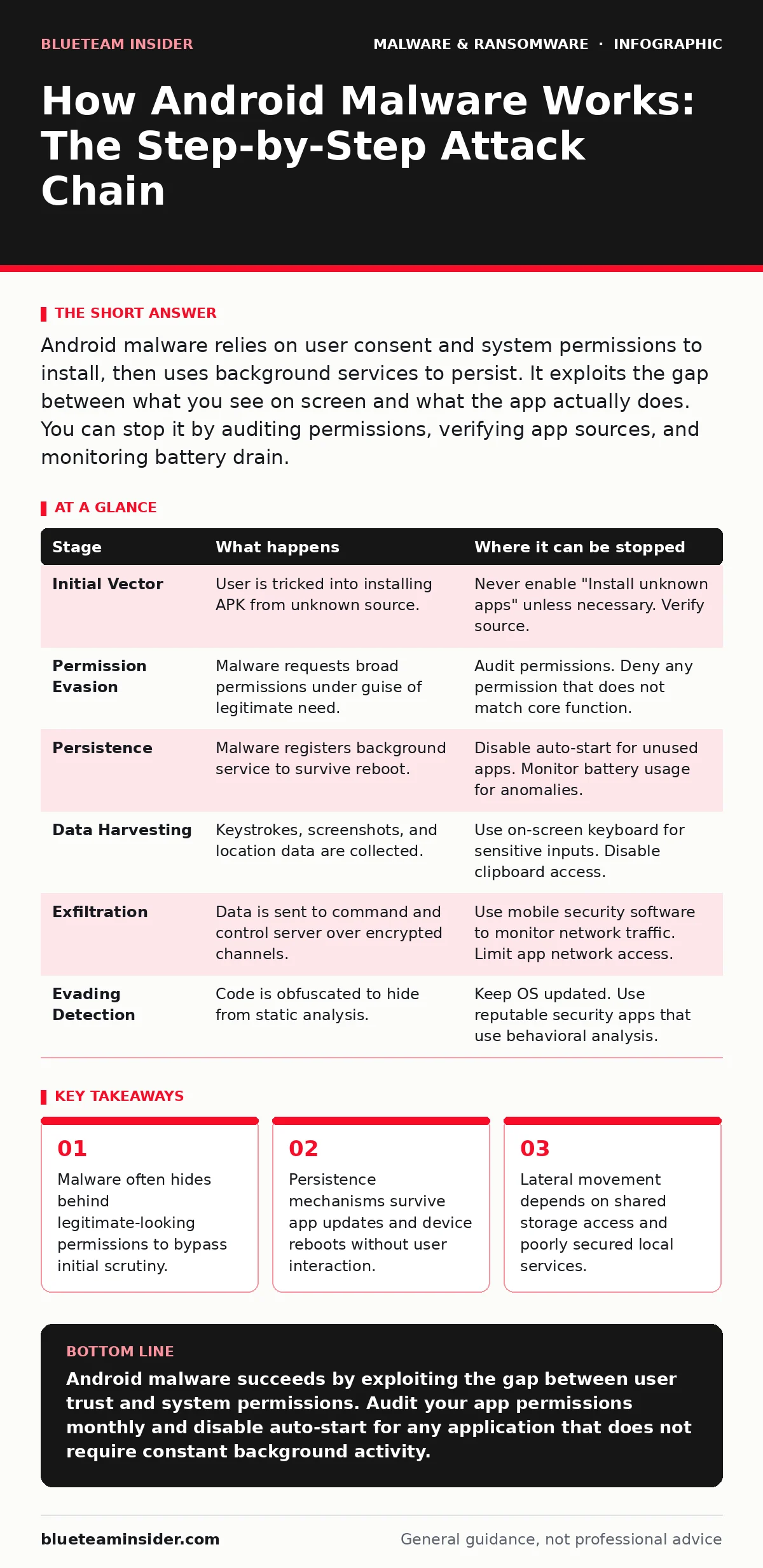
| Stage | What happens | Where it can be stopped |
|---|---|---|
| Initial Vector | User is tricked into installing APK from unknown source. | Never enable "Install unknown apps" unless necessary. Verify source. |
| Permission Evasion | Malware requests broad permissions under guise of legitimate need. | Audit permissions. Deny any permission that does not match core function. |
| Persistence | Malware registers background service to survive reboot. | Disable auto-start for unused apps. Monitor battery usage for anomalies. |
| Data Harvesting | Keystrokes, screenshots, and location data are collected. | Use on-screen keyboard for sensitive inputs. Disable clipboard access. |
| Exfiltration | Data is sent to command and control server over encrypted channels. | Use mobile security software to monitor network traffic. Limit app network access. |
| Evading Detection | Code is obfuscated to hide from static analysis. | Keep OS updated. Use reputable security apps that use behavioral analysis. |
The Hidden Cost of Convenience
The biggest risk is not the malware itself, but the habits you form to use your device. You want apps to work seamlessly. You want notifications to come through. You want apps to start quickly. These conveniences require permissions. The more convenience you demand, the more access you grant.
Malware exploits this trade-off. It asks for the minimum permission needed to be useful, then uses that access to do harm. It relies on your assumption that the app does what it says it does. It hides its malicious code behind legitimate functionality.
See also: Banking Trojans Prevention Checklist for Secure Transactions
Breaking the Chain
You can break the chain at any stage. The earlier you act, the less damage occurs. The most effective control is user awareness. You are the gatekeeper. The operating system provides tools, but you must use them.
Regularly review your installed apps. Remove any you do not recognize or use. Check permissions for each app. If an app has more permissions than it needs, remove it. Keep your device updated. Updates patch the vulnerabilities that malware exploits.
Use a mobile security app that monitors behavior, not just signatures. Signatures detect known malware. Behavioral analysis detects suspicious actions. It looks for apps that try to access sensitive data at odd times or send large amounts of data.
Key takeaways
- Malware often hides behind legitimate-looking permissions to bypass initial scrutiny.
- Persistence mechanisms survive app updates and device reboots without user interaction.
- Lateral movement depends on shared storage access and poorly secured local services.
Android malware succeeds by exploiting the gap between user trust and system permissions. Audit your app permissions monthly and disable auto-start for any application that does not require constant background activity.
Frequently asked questions
Can Android malware steal my bank details directly?
No, Android’s security model prevents one app from reading another app’s data directly. Malware typically steals credentials by recording keystrokes or taking screenshots while you type.
Can a factory reset remove all Android malware?
Yes, in most cases. A factory reset wipes all data and apps. However, if the malware has exploited a deep system vulnerability, it might survive. This is rare on modern, updated devices.
How this guide was produced: written by the BlueTeam Insider editorial team with AI assistance, checked against the public references listed below, and reviewed when the facts change. See our editorial policy or report an error.