How to Stop Brute Force Attacks: 5 Proven Methods
Blocking individual failed logins fails when attackers rotate IP addresses, making credential verification the only reliable defense against persistent guessing.
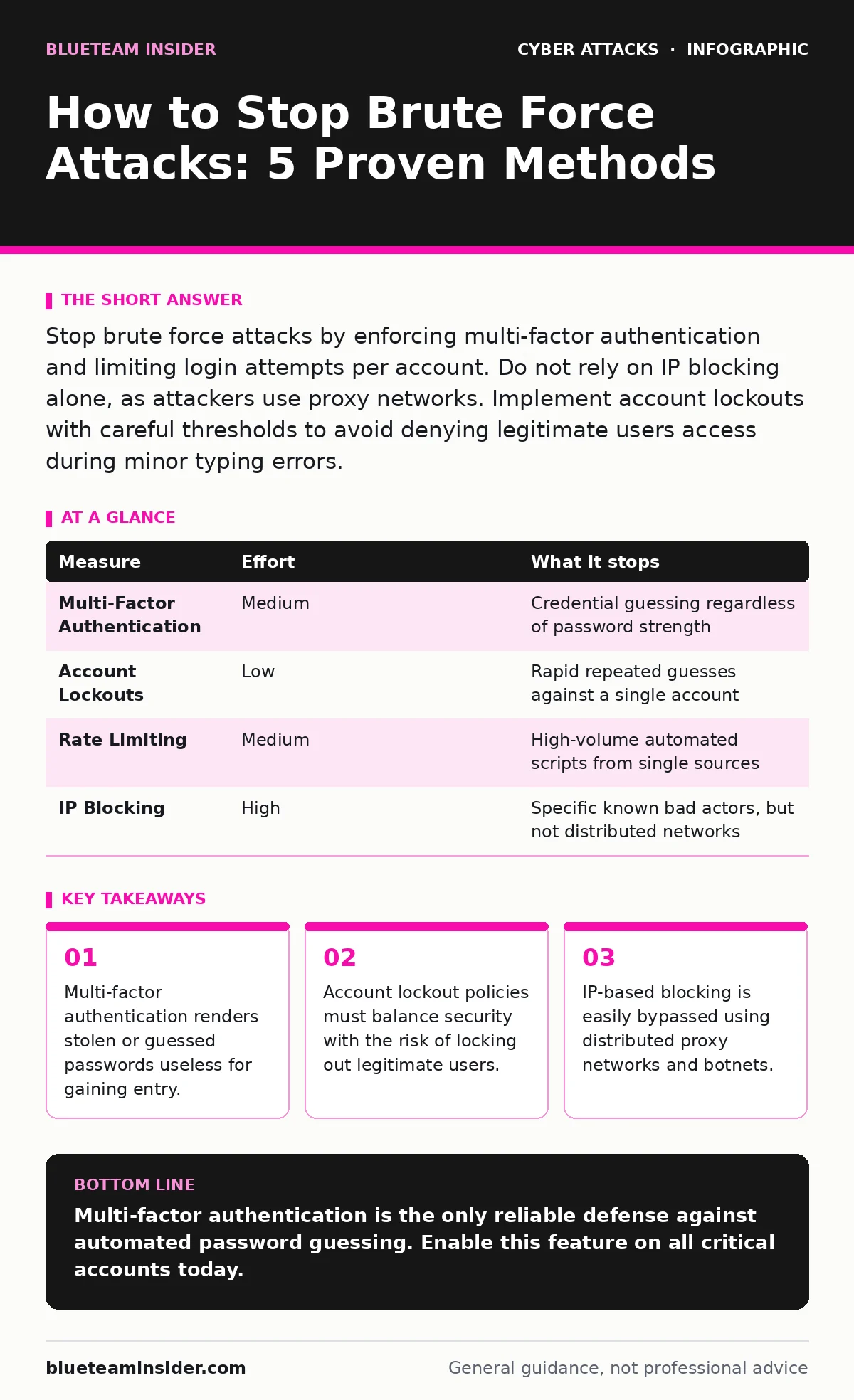
Stop brute force attacks by enforcing multi-factor authentication and limiting login attempts per account. Do not rely on IP blocking alone, as attackers use proxy networks. Implement account lockouts with careful thresholds to avoid denying legitimate users access during minor typing errors.
Why Brute Force Attacks Succeed
Brute force attacks succeed because many systems accept unlimited login attempts from a single source. Attackers use automated scripts to try thousands of password combinations against a login page. They do not need to guess your specific password immediately. They only need time and access. If your system allows unlimited tries, the script will eventually match a weak password. This method works against any system that relies solely on username and password pairs. The attacker does not care if the first thousand guesses fail. They care that the system remains open for the ten-thousandth guess.
How to Stop Brute Force Attacks
You stop brute force attacks by removing the attacker’s ability to guess credentials repeatedly. The most effective method is multi-factor authentication. This requires a second proof of identity, such as a code from a mobile device. Even if the script guesses the password, it cannot provide the second factor. The second method is account lockout policies. These policies disable an account after a set number of failed attempts. This stops the script from continuing against that specific account. The third method is rate limiting. This slows down the number of requests a server accepts from one source. It forces the attacker to slow their script, making the attack too slow to be practical.
The Limitations of IP Blocking
Many administrators believe blocking IP addresses stops brute force attacks. This belief is dangerous. Modern attackers use botnets consisting of thousands of infected devices. Each device has a different IP address. When one IP is blocked, the script moves to the next. Blocking IPs creates a high volume of administrative work. You spend time updating firewall rules instead of securing accounts. This approach also risks blocking legitimate users who share an IP address, such as those in large corporate networks. IP blocking treats the symptom, not the disease. It does not prevent the credential guessing itself.
Multi-Factor Authentication as a Barrier
Multi-factor authentication adds a layer that passwords cannot provide. Passwords are secrets that can be guessed or stolen. Second factors are often tied to a physical device the attacker does not possess. When you enable this, a correct password is no longer enough for login. The system demands additional proof. This breaks the automated guessing loop. The script can guess the password, but it cannot interact with your phone or security key. This measure works even if the attacker has your exact password. It forces them to find a new attack vector, such as social engineering or phishing, which are harder to automate at scale.
Configuring Account Lockouts Safely
Account lockouts prevent repeated guesses against a single account. You must set the threshold carefully. If you lock an account after 3 failed tries, a user with a typo will be locked out frequently. This creates help desk tickets and user frustration. If you set it to 100 tries, the attacker has too many guesses. A balance exists between security and usability. Consider progressive delays. The first five failures are ignored. The sixth failure locks the account for five minutes. The next failure locks it for an hour. This slows the attacker without immediately punishing minor user errors. It makes the attack economically unviable for the criminal.
| Measure | Effort | What it stops |
|---|---|---|
| Multi-Factor Authentication | Medium | Credential guessing regardless of password strength |
| Account Lockouts | Low | Rapid repeated guesses against a single account |
| Rate Limiting | Medium | High-volume automated scripts from single sources |
| IP Blocking | High | Specific known bad actors, but not distributed networks |
The Risk of Account Enumeration
A common mistake is telling users exactly which part of their login failed. Some systems say "User not found" when the username is wrong, and "Password incorrect" when the password is wrong. This helps attackers build a list of valid usernames. They can then focus their brute force efforts only on existing accounts. This reduces the number of guesses needed. Always use generic error messages. Say "Invalid username or password" regardless of the actual error. This forces the attacker to guess both the username and the password simultaneously. This increases the complexity of the attack significantly. It protects your user database from being mapped out.
Advanced Protection Strategies
For high-value accounts, consider password spraying. This technique tries one common password against many usernames. It avoids triggering account lockouts on a single user. To stop this, monitor for unusual login patterns across many accounts. Look for multiple failures from one IP or user agent in a short time. Implement login alerts to notify users of suspicious activity. This allows users to report compromised credentials quickly. Combine this with strong password requirements. Long, complex passwords increase the time needed to guess them. While no measure is perfect, layering these defenses makes automated attacks too difficult to sustain.
Immediate Action Checklist
You can reduce your risk today with three specific actions. First, enable multi-factor authentication on all administrative and external-facing accounts. This is the single most effective change you can make. Second, review your error messages. Ensure they do not reveal whether a username exists. Third, check your account lockout settings. Ensure they balance security with usability. Do not leave these settings at default values. Customize them to fit your user base. These steps remove the advantage attackers gain from speed and automation. They force the attacker to spend more time and resources than they likely have.
Understanding Attack Vectors
Brute force is often part of a larger campaign. Attackers may use email spoofing to trick users into resetting passwords. They may use shoulder surfing to observe physical login behavior. Understanding these related tactics helps you defend better. A single password compromise might not be brute force. It might be the result of a user clicking a malicious link. Security is a chain. The weakest link determines your safety. Brute force attacks target the password link. Strengthening other links, like user awareness and network monitoring, supports your defense. You must look beyond the login page to understand the full threat.
Key takeaways
- Multi-factor authentication renders stolen or guessed passwords useless for gaining entry.
- Account lockout policies must balance security with the risk of locking out legitimate users.
- IP-based blocking is easily bypassed using distributed proxy networks and botnets.
Multi-factor authentication is the only reliable defense against automated password guessing. Enable this feature on all critical accounts today.
Frequently asked questions
Does changing my password every month stop brute force attacks?
No, frequent password changes do not stop automated scripts that try combinations in real-time. Focus on multi-factor authentication instead.
Can I use CAPTCHAs to prevent brute force attacks?
CAPTCHAs slow down attackers but do not stop them. Advanced bots can solve simple CAPTCHAs, and complex ones frustrate legitimate users.
How do I know if I am under a brute force attack?
Look for a high volume of failed login attempts from different IP addresses or a single source in a short period. Monitor your logs for these patterns.
Are password managers effective against brute force attacks?
Yes, password managers generate long, random passwords that are impossible to guess quickly. This increases the time needed for a successful brute force attempt.
How this guide was produced: written by the BlueTeam Insider editorial team with AI assistance, checked against the public references listed below, and reviewed when the facts change. See our editorial policy or report an error.