User Access Provisioning: Definition, Purpose, and Security Risks
Access provisioning determines who can see what data, creating a silent accumulation of permissions that outlives the original business need.
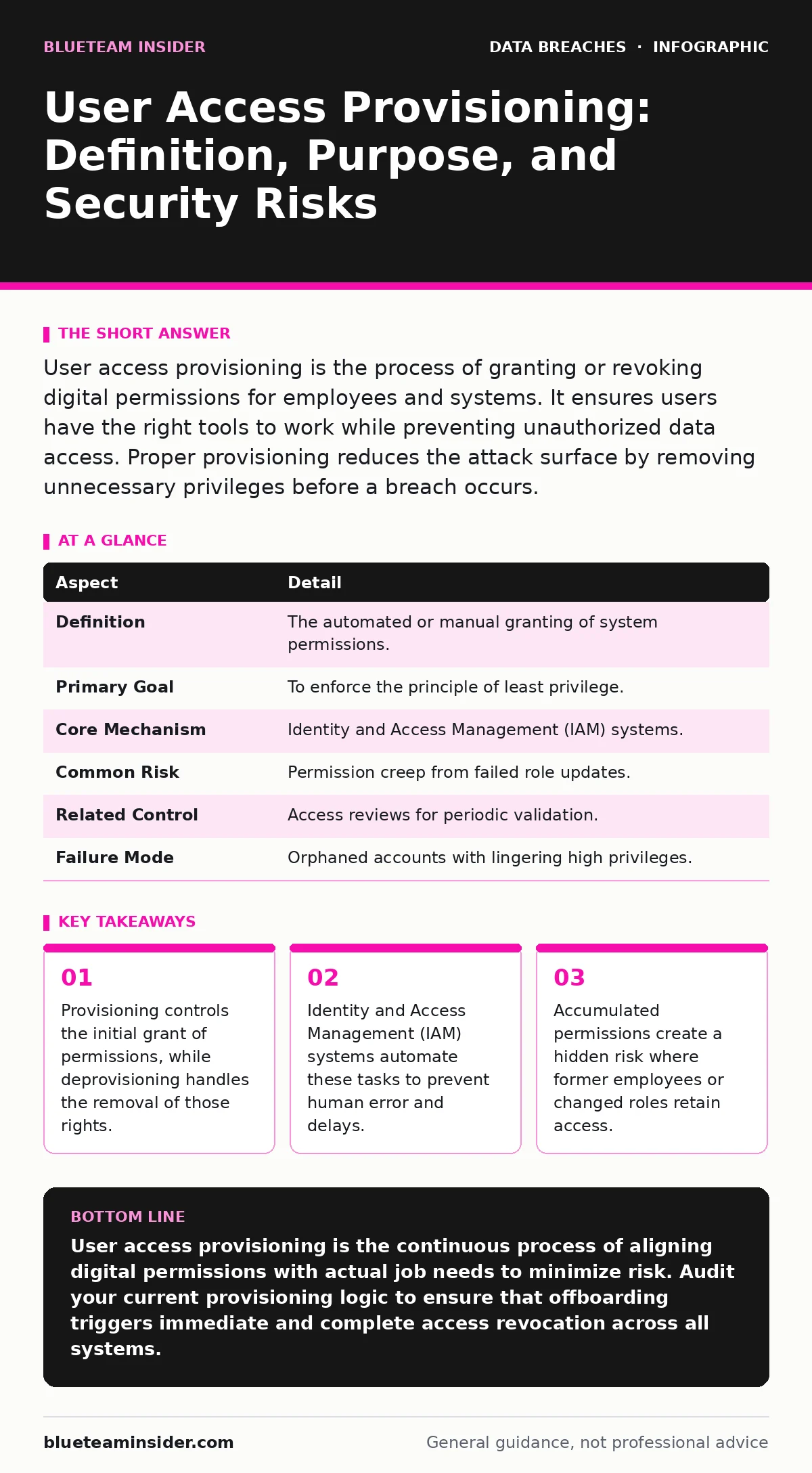
User access provisioning is the process of granting or revoking digital permissions for employees and systems. It ensures users have the right tools to work while preventing unauthorized data access. Proper provisioning reduces the attack surface by removing unnecessary privileges before a breach occurs.
The Digital Key Card Analogy
Imagine a large office building with strict security. When a new employee starts, they receive a key card. This card grants entry to the lobby, the cafeteria, and their specific department. If that person transfers to a different floor, the security team must update the card. If they leave the company, the card must be deactivated immediately.
User access provisioning works the same way in digital systems. It is the mechanism that assigns digital keys to users. These keys determine which files, applications, or networks a person can touch. Without this process, you would manually configure every single permission for every new hire. That approach is slow, error-prone, and dangerous.
Provisioning ensures that access aligns with job function. It prevents a marketing intern from accessing financial records. It also ensures that when roles change, access changes with them. This alignment reduces the chance that a compromised account causes widespread damage.
| Aspect | Detail |
|---|---|
| Definition | The automated or manual granting of system permissions. |
| Primary Goal | To enforce the principle of least privilege. |
| Core Mechanism | Identity and Access Management (IAM) systems. |
| Common Risk | Permission creep from failed role updates. |
| Related Control | Access reviews for periodic validation. |
| Failure Mode | Orphaned accounts with lingering high privileges. |
The Problem of Unchecked Access
The core problem provisioning solves is permission creep. This occurs when users accumulate rights over time without losing old ones. Suppose a developer moves to a sales role. They keep their code repository access while gaining CRM access. Now they hold keys to two distinct areas.
If an attacker compromises this account, they gain entry to both environments. The attack surface expands silently. You cannot see the risk because the account appears active and legitimate. The user has a valid reason to be in the system, but not for all the resources they can reach.
Provisioning addresses this by defining clear boundaries. It ties access to specific job titles or project needs. When those needs end, the access should end too. This limits the blast radius of any single credential compromise. It makes it harder for an attacker to move laterally across your network.
How Provisioning Fits in Defense
Provisioning sits at the center of your security architecture. It connects human identity to digital resources. It works alongside other controls to create layers of defense. For example, multi-factor authentication verifies who you are, but provisioning decides what you can do once verified.
Consider the risk of lost and stolen devices. If a laptop is stolen, the thief has physical access to the machine. However, if provisioning correctly limited the local user account to only necessary apps, the thief cannot access sensitive cloud data stored elsewhere. The physical breach does not become a data breach.
Provisioning also interacts with credential exposure. If passwords leak on the dark web, the attacker can try to log in. Strong provisioning ensures that even with valid credentials, the attacker cannot reach critical systems unless the compromised account had those specific permissions. It restricts the value of stolen secrets.
The Mechanics of Granting and Revoking
The process has two main phases: granting and revoking. Granting happens when a user joins or changes roles. Revoking happens when they leave or change roles again. Many organizations focus heavily on onboarding but neglect offboarding.
Automated systems trigger these actions based on triggers. A human resources system might flag a termination date. The identity provider then sends a signal to disable accounts across email, file storage, and applications. This automation is critical because manual processes fail under stress or distraction.
Deprovisioning is often the weaker link. IT staff may delay disabling accounts to avoid disrupting ongoing projects. This delay creates a window of vulnerability. During this time, a former employee can still access data. They might download files or alter records without immediate detection.
What People Usually Get Wrong
A common mistake is assuming that provisioning is a one-time event. Security is not a setup task; it is a continuous state. Permissions drift over time as business needs shift. A project ends, but the access remains. A tool becomes obsolete, but the account stays linked to it.
Another error is relying solely on technical controls without process validation. You can build a perfect provisioning engine, but if the initial data about roles is wrong, the system grants the wrong access. Garbage in, garbage out. The system executes instructions, not intent.
Organizations also struggle with service accounts. These are non-human accounts used by applications to talk to each other. They often have broad permissions because they need to move data between systems. Unlike human accounts, they do not log in with a keyboard. This makes them harder to monitor and easier to overlook in provisioning audits.
See also: Hybrid Cloud Security Explained: How to Lock Down Mixed Environments · Access Review Mistakes That Leave Your Data Exposed
The Hidden Cost of Over-Provisioning
Over-provisioning gives users more access than they need. It feels helpful. It reduces friction for the user. They do not have to request access or wait for approval. However, it increases risk significantly.
Each extra permission is a potential entry point for an attacker. It is also a potential vector for accidental data loss. A user with write access to a production database might accidentally delete a table. A user with read access to financial models might accidentally share them with the wrong external partner.
This connects to employee data breaches. Often, these breaches are not malicious. They are accidents caused by users having access to data they should not see. By tightening provisioning, you reduce the likelihood of these errors. You limit the data available to any single user at any single time.
Integrating with Broader Security Practices
Provisioning must work with other security disciplines. It relies on accurate data from access reviews. These reviews confirm that current permissions are still valid. Without reviews, provisioning systems operate on outdated assumptions. They assume that because access was granted once, it is still needed.
Provisioning also supports data masking efforts. If you mask sensitive data in development environments, you still need to provision access to those masked datasets. The provisioning system must distinguish between production access and masked access. It ensures developers can test code without seeing real customer names.
Finally, consider backup data exposure. Backups are copies of your live data. If provisioning fails to restrict who can access backup storage, attackers can bypass normal application controls. They can read the raw backups directly. Proper provisioning ensures that only specific backup management tools and administrators can touch those copies.
The Role of Identity Governance
Identity Governance and Administration (IGA) is the broader framework that oversees provisioning. It provides the policy engine. It defines the rules for who gets what. Provisioning is the execution engine. It carries out the rules defined by IGA.
Without IGA, provisioning is just a series of disconnected scripts. With IGA, you have a unified view of access across the organization. You can see which users have high-risk permissions. You can automate the certification process where managers approve or deny continued access.
This integration allows for dynamic access. Access can be granted for a specific time window and then removed. It can be granted only from certain locations or devices. This flexibility reduces the need for permanent high-level access. It keeps the attack surface small and manageable.
Key takeaways
- Provisioning controls the initial grant of permissions, while deprovisioning handles the removal of those rights.
- Identity and Access Management (IAM) systems automate these tasks to prevent human error and delays.
- Accumulated permissions create a hidden risk where former employees or changed roles retain access.
- Regular access reviews verify that current permissions match actual job responsibilities.
User access provisioning is the continuous process of aligning digital permissions with actual job needs to minimize risk. Audit your current provisioning logic to ensure that offboarding triggers immediate and complete access revocation across all systems.
Frequently asked questions
What is the difference between provisioning and authentication?
Authentication verifies who you are, such as through a password or biometric scan. Provisioning determines what you are allowed to do once your identity is confirmed. One proves identity, the other grants capability.
Can automation completely replace manual access requests?
Automation can handle standard role-based access efficiently. However, exceptional or high-risk access usually requires human approval to ensure business necessity. Automation executes the decision, but humans often make the judgment call.
How does provisioning help with compliance?
Compliance frameworks require proof that only authorized users access sensitive data. Provisioning logs provide an audit trail of who was granted access, when, and why. This documentation is critical for demonstrating control during audits.
What happens if provisioning fails during an emergency?
If automated provisioning fails, manual intervention is required. This creates a delay and increases the risk of error. Organizations should have break-glass procedures for urgent access needs, but these must be logged and reviewed immediately afterward.
How this guide was produced: written by the BlueTeam Insider editorial team with AI assistance, checked against the public references listed below, and reviewed when the facts change. See our editorial policy or report an error.