SQL Injection Mistakes That Leave Your Database Exposed
Many developers believe modern frameworks prevent SQL injection, yet raw string concatenation in dynamic queries remains a persistent and easily overlooked vulnerability in enterprise applications.

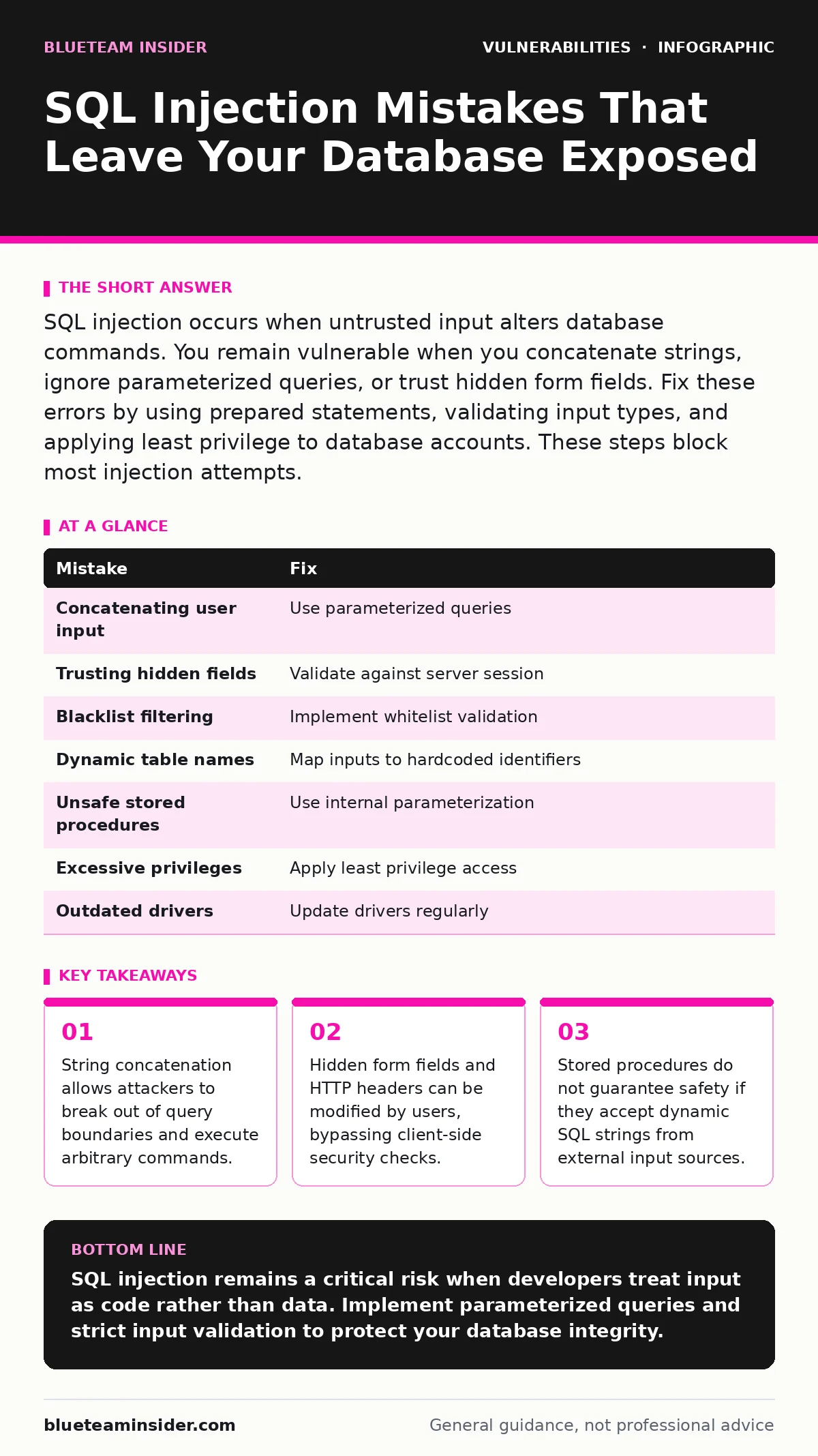
SQL injection occurs when untrusted input alters database commands. You remain vulnerable when you concatenate strings, ignore parameterized queries, or trust hidden form fields. Fix these errors by using prepared statements, validating input types, and applying least privilege to database accounts. These steps block most injection attempts.
Mistake 1: Concatenating User Input into Query Strings
Building SQL queries by joining static strings with user-supplied data is the primary cause of injection flaws. When you append a variable directly to a command, the database cannot distinguish between code and data. This allows an attacker to terminate the intended statement and inject new commands.
Why it hurts: The database executes the injected commands with the same privileges as the application. An attacker can read, modify, or delete data across the entire table. They may also access system files or escalate privileges. This bypasses all application-level logic and validation.
The fix: Use parameterized queries, also known as prepared statements. This method sends the query structure and the data values to the database separately. The database treats the values strictly as data, never as executable code. Most modern database drivers support this natively.
Mistake 2: Trusting Hidden Form Fields or Cookies
Developers often store data like user IDs in hidden HTML form fields or cookies to reduce server load. They assume these values cannot be changed by the user. This assumption is false because users control their entire client environment. They can edit any field before submission.
Why it hurts: If the server uses these values directly in a database query, an attacker can change the ID to a malicious payload. This allows them to access records belonging to other users or extract sensitive information. It breaks the principle of authorization because the server trusts the client.
The fix: Treat all client-side inputs as untrusted. Verify that the submitted value matches the server-side session state. Never use client-supplied identifiers for critical operations without server-side validation. Use server-side sessions to track authorized data access.
Mistake 3: Relying on Blacklist Filtering
Blacklist filtering attempts to block known malicious patterns, such as single quotes or semicolons, from user input. This approach is flawed because attackers can use encoding techniques to bypass simple string checks. They may use Unicode, hex encoding, or other representations that the filter misses.
Why it hurts: Blacklists are incomplete and difficult to maintain. An attacker only needs to find one encoding method that your filter does not recognize to gain access. This creates a false sense of security. It also often breaks legitimate functionality, causing usability issues for normal users.
The fix: Replace blacklist filtering with whitelist validation. Define exactly what characters and formats are allowed for each input field. For example, if a field requires an integer, reject any input that contains non-numeric characters. This ensures only safe data reaches the database layer.
Mistake 4: Using Dynamic Table or Column Names
Parameterized queries protect values, but they do not protect structural elements like table or column names. Developers often build queries that dynamically choose which column to sort by or which table to query. These structural parts must be embedded in the SQL string directly.
Why it hurts: An attacker can inject malicious table or column names. This allows them to pivot to different data sets or execute commands that read from system tables. Since these are not values, parameterized queries cannot sanitize them automatically. The injection occurs before the query is prepared.
The fix: Use a strict whitelist for dynamic structural elements. Map user choices to hardcoded, safe identifiers in your code. If a user selects "sort by date," your code should insert the literal string "date" into the query. Never pass user input directly into table or column name placeholders.
Mistake 5: Ignoring Stored Procedure Risks
Many developers believe that using stored procedures eliminates SQL injection risks. This is a common misconception. Stored procedures are safe only if they use parameterized inputs internally. If the procedure builds dynamic SQL strings from its parameters, it remains vulnerable to injection.
Why it hurts: Attackers can exploit the same string concatenation flaws within the stored procedure. They may pass malicious strings as parameters, which the procedure then executes. This can lead to data exfiltration or privilege escalation. The abstraction layer does not hide the underlying code execution risk.
The fix: Review stored procedures for dynamic SQL generation. Ensure that all inputs are treated as data within the procedure. Use native parameterization inside the procedure logic. Consider the principles of threat modeling to identify where dynamic SQL is necessary and how to restrict its scope.
Mistake 6: Granting Excessive Database Privileges
Applications often connect to the database using accounts with administrative privileges. This simplifies development but creates a massive security risk. If an injection occurs, the attacker inherits these high-level privileges. They can modify database structures, create new users, or shut down the service.
Why it hurts: The impact of an injection scales with the privileges of the database account. An admin account allows an attacker to compromise the entire database system. A restricted account limits the damage to specific tables or rows. Excessive privileges turn a minor flaw into a catastrophic breach.
The fix: Apply the principle of least privilege. Create a dedicated database user for the application with only the permissions it needs. Grant read, write, or execute rights on specific tables only. This limits the blast radius of any potential injection attack.
Mistake 7: Failing to Update Database Drivers
Old database drivers may contain known vulnerabilities or lack support for modern security features like parameterized queries. Developers often neglect to update these components, assuming the application code is the only variable. This leaves the communication layer exposed to exploitation.
Why it hurts: Outdated drivers may have bugs that allow injection even when best practices are followed. They may also lack protections against newer attack vectors. Updating drivers ensures you benefit from security patches and improved validation mechanisms. Neglecting this step undermines your other security efforts.
The fix: Maintain a regular schedule for updating database drivers and libraries. Integrate these updates into your change management for security patches process. Test updates thoroughly to ensure compatibility. This reduces the risk of exploiting known driver vulnerabilities.
| Mistake | Fix |
|---|---|
| Concatenating user input | Use parameterized queries |
| Trusting hidden fields | Validate against server session |
| Blacklist filtering | Implement whitelist validation |
| Dynamic table names | Map inputs to hardcoded identifiers |
| Unsafe stored procedures | Use internal parameterization |
| Excessive privileges | Apply least privilege access |
| Outdated drivers | Update drivers regularly |
Key takeaways
- String concatenation allows attackers to break out of query boundaries and execute arbitrary commands.
- Hidden form fields and HTTP headers can be modified by users, bypassing client-side security checks.
- Stored procedures do not guarantee safety if they accept dynamic SQL strings from external input sources.
SQL injection remains a critical risk when developers treat input as code rather than data. Implement parameterized queries and strict input validation to protect your database integrity.
Frequently asked questions
Does using an ORM prevent SQL injection?
Object-Relational Mappers often use parameterized queries by default, but they can still be vulnerable if you use raw SQL strings or dynamic queries. Verify that your ORM usage does not bypass these protections.
Can SQL injection occur in NoSQL databases?
Yes, NoSQL databases are also susceptible to injection if user input is not properly sanitized. Attackers can inject operators or regex patterns to manipulate queries. Apply the same input validation principles used for SQL.
How do I detect an SQL injection attempt?
Monitor your application logs for unusual characters, such as quotes or semicolons, in input fields. Look for errors that suggest malformed queries. Implement Web Application Firewalls to filter known attack patterns.
Is it safe to use stored procedures for all queries?
Stored procedures can improve security if they use parameterized inputs internally. However, they do not eliminate the risk if they contain dynamic SQL. Review the internal logic of every stored procedure for potential injection flaws.
How this guide was produced: written by the BlueTeam Insider editorial team with AI assistance, checked against the public references listed below, and reviewed when the facts change. See our editorial policy or report an error.