Patch Management Mistakes That Break Production Systems
Rushing patches without testing causes more downtime than leaving systems exposed to known exploits, creating a false sense of security.

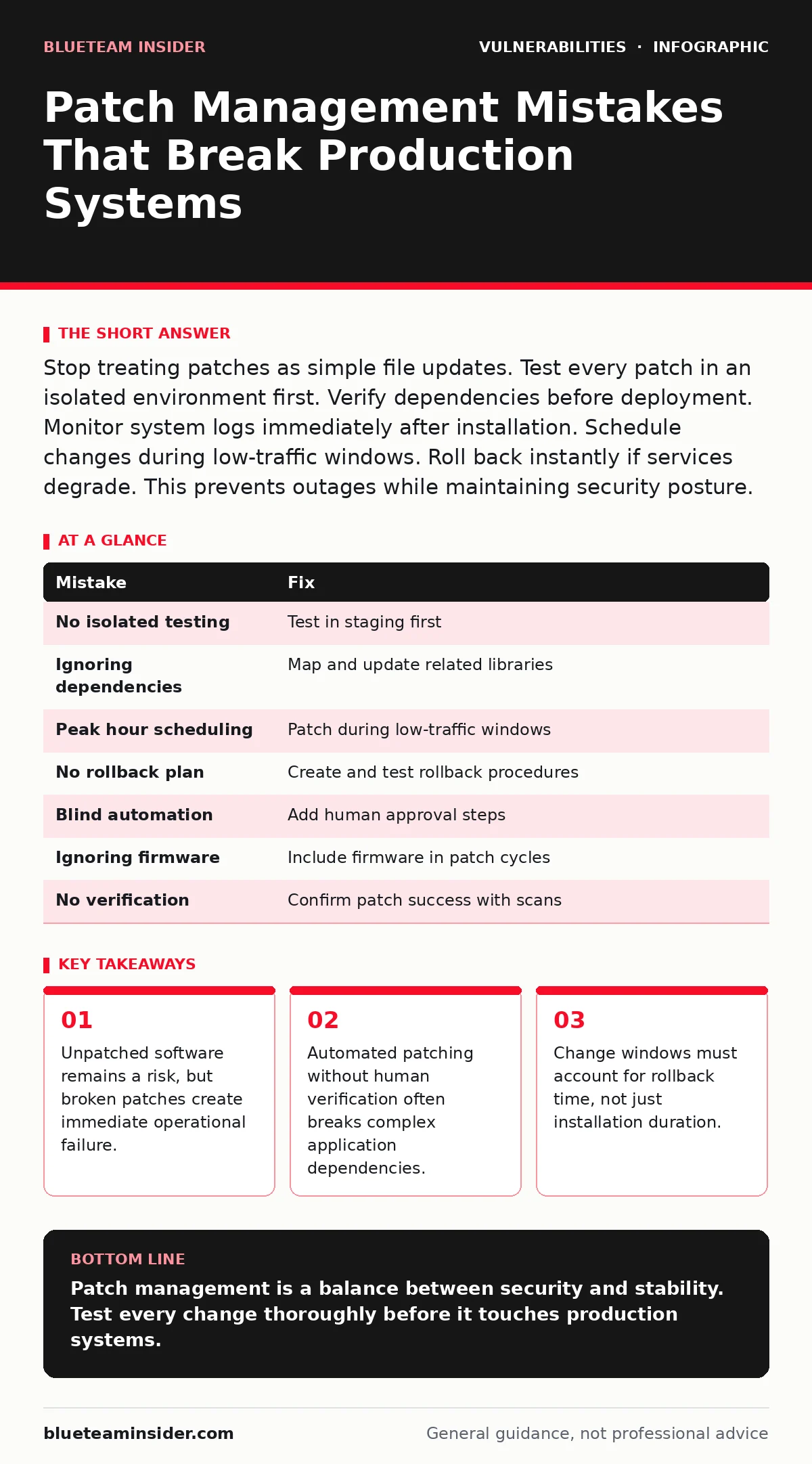
Stop treating patches as simple file updates. Test every patch in an isolated environment first. Verify dependencies before deployment. Monitor system logs immediately after installation. Schedule changes during low-traffic windows. Roll back instantly if services degrade. This prevents outages while maintaining security posture.
Mistake 1: Applying Patches Without Isolated Testing
Why it hurts:
You assume the vendor tested the patch thoroughly. Vendors test against standard configurations, not your unique environment. A patch may conflict with custom scripts, legacy libraries, or specific hardware drivers. This conflict causes application crashes or data corruption. The system becomes unavailable immediately after the update. You face emergency repairs instead of scheduled maintenance.
The fix:
Create a staging environment that mirrors production exactly. Install the patch on staging servers first. Run your full regression test suite. Verify that all dependent services communicate correctly. Only promote the patch to production after 24 hours of stable operation in staging. This process catches compatibility issues before they impact users.
Mistake 2: Ignoring Dependency Conflicts
Why it hurts:
Modern applications rely on complex chains of libraries. A security patch for one library may require a newer version of another. If you update only the vulnerable component, the application fails to load. This is common with server-side template injection fixes that alter how code parses input. The application may return blank pages or error codes. Users cannot access critical features.
The fix:
Map all dependencies before applying any patch. Use automated tools to identify version requirements. Update all related components simultaneously. Test the entire stack, not just the patched component. Document the specific versions that work together. Maintain a known-good configuration baseline. This prevents cascading failures across interconnected services.
Mistake 3: Scheduling Changes During Peak Hours
Why it hurts:
You schedule patches when the team is most available. This often coincides with peak user traffic. Restarting services during high load causes connection drops. Users experience timeouts or failed transactions. Customer trust erodes quickly. Support tickets surge, distracting your team from the patching process. The pressure to rush increases the risk of errors.
The fix:
Schedule changes during low-traffic windows. Identify historical usage patterns to find quiet periods. Notify users of planned maintenance windows in advance. Limit the scope of changes to non-critical systems during business hours. Reserve critical infrastructure updates for off-peak times. This minimizes user impact and reduces operational stress.
Mistake 4: Skipping Rollback Procedures
Why it hurts:
You assume the patch will work perfectly. When it fails, you have no predefined method to revert. You waste hours diagnosing why the patch broke the system. Meanwhile, the system remains down. The longer you wait, the more data is lost or corrupted. Panic leads to hasty decisions that compound the problem. You lose more time fixing the breakage than applying the patch would have taken.
The fix:
Define a rollback procedure before starting any change. Create system snapshots or backups immediately before patching. Test the rollback process in staging. Document the exact steps to restore the previous state. Assign a specific person to execute the rollback if needed. Keep the rollback window open until the new state is verified stable. This ensures rapid recovery from failures.
Mistake 5: Automating Everything Without Human Review
Why it hurts:
You trust automation to handle all patching tasks. Automation applies patches blindly across all systems. It does not recognize unique configurations or critical exceptions. A critical server receives a patch that breaks its specific workload. The automation continues, spreading the failure to other systems. You lose the ability to make nuanced decisions. The system becomes fragile and unpredictable.
The fix:
Use automation for notification and scheduling, not execution. Require human approval for critical systems. Implement approval workflows that check for dependency changes. Monitor automated patches closely after deployment. Review logs for anomalies. Combine automation with human oversight. This balances speed with safety.
Mistake 6: Neglecting Firmware and Embedded Systems
Why it hurts:
You focus only on operating systems and applications. Firmware vulnerabilities remain unaddressed. These components run at a lower level than the OS. They can bypass many security controls. Attackers exploit these gaps to gain persistent access. Traditional patching tools often ignore firmware. You believe you are secure because the OS is updated. The underlying hardware remains vulnerable.
The fix:
Include firmware in your inventory and patching schedule. Check vendor release notes for firmware updates. Apply firmware updates during scheduled maintenance windows. Test firmware updates carefully, as they are harder to rollback. Document firmware versions alongside software versions. Treat firmware as a critical security layer. This closes low-level attack vectors.
Mistake 7: Failing to Verify Patch Success
Why it hurts:
You apply the patch and move on. You do not verify that the patch installed correctly. The installation may have failed silently. The system remains vulnerable to the exploit. You assume protection exists when it does not. An attacker exploits the unpatched vulnerability. You discover the breach weeks later. The lack of verification created a false sense of security.
The fix:
Verify patch installation immediately after deployment. Check system logs for success messages. Run vulnerability scanning tools to confirm the vulnerability is closed. Compare system hashes before and after patching. Document the verification results. Repeat verification after reboots. This confirms the patch is active and effective.
| Mistake | Fix |
|---|---|
| No isolated testing | Test in staging first |
| Ignoring dependencies | Map and update related libraries |
| Peak hour scheduling | Patch during low-traffic windows |
| No rollback plan | Create and test rollback procedures |
| Blind automation | Add human approval steps |
| Ignoring firmware | Include firmware in patch cycles |
| No verification | Confirm patch success with scans |
Key takeaways
- Unpatched software remains a risk, but broken patches create immediate operational failure.
- Automated patching without human verification often breaks complex application dependencies.
- Change windows must account for rollback time, not just installation duration.
Patch management is a balance between security and stability. Test every change thoroughly before it touches production systems.
Frequently asked questions
How do I handle emergency patches?
Emergency patches bypass standard testing but still require immediate staging verification. Deploy to a small subset of servers first. Monitor closely before full rollout.
What if a patch breaks a critical application?
Execute your predefined rollback procedure immediately. Restore from the snapshot taken before patching. Investigate the failure in staging later.
How this guide was produced: written by the BlueTeam Insider editorial team with AI assistance, checked against the public references listed below, and reviewed when the facts change. See our editorial policy or report an error.